

The starting point for this article was not a strategic architecture workshop or a long-term planned migration path, but a comparatively unspectacular step: updating the version numbers in the existing project. As part of further developing my URL shortener project, a regular dependency update was due anyway. Vaadin 25 (was already available at that time, so it made sense to proceed.
The source code for the project can be found and is
available underhttps://3g3.eu/url
The expectations were realistic, perhaps even slightly sceptical. A new major release, new minimum requirements, a modernised stack – all of these are usually good reasons to expect at least minor adjustments or initial friction. Accordingly, there was little hope that simply checking the version numbers would be sufficient.
- Why Vaadin 25 is more than a version leap
- The new minimum standard: Java 21, Jakarta EE and modern platforms
- Leaner stack, faster builds and less ballast.
- Styling & Theming Rethought: CSS Instead of Special Logic
- Component and rendering improvements in everyday life
- Element API, SVG and MathML: Technical UIs directly from Java
However, that was exactly the case. After adapting the Vaadin version and the current Java and platform dependencies, the project could be built, started, and operated without further changes. The application behaved as before: views were rendered correctly, dialogues worked, styles were intact, and even more complex UI flows showed no abnormalities.
This result was remarkable in that it was not based on a super trivial demo project. The URL shortener is a mature application with a clear module structure, server-side UI logic, security mechanisms and a small number of UI components. The fact that a major upgrade was possible under these conditions without immediate follow-up work is not routine.
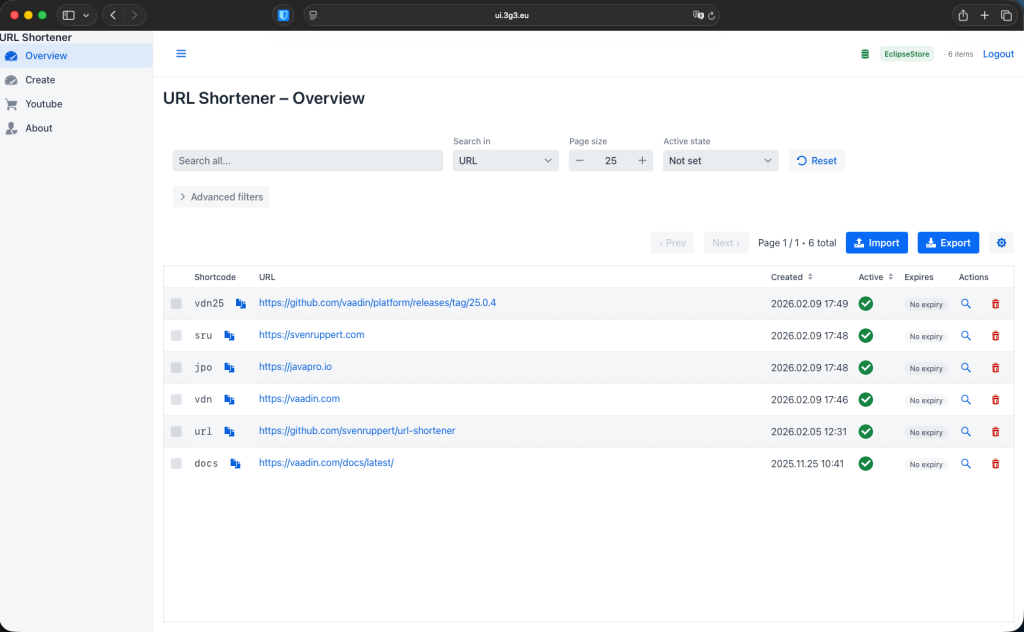
It was precisely this experience that triggered a closer look at Vaadin 25. If a framework upgrade of this magnitude works right away, the question inevitably arises: why? What decisions in the substructure make this possible? Where was stability deliberately focused? And where are the changes lurking that only become relevant on closer inspection?
Why Vaadin 25 is more than a version leap#
Vaadin 25 does not mark a classic evolutionary step with a collection of new widgets or API extensions, but a deliberate realignment of the framework. While previous major releases often featured additional features or incremental improvements, Vaadin 25 focuses on consolidation: fewer special logic elements, less legacy, and closer alignment with established standards in modern Java and web development.
This realignment is a direct response to the reality of many productive enterprise applications. Today, long-running web UIs must not only be functional but also maintainable, secure, and easy to integrate for years. This is exactly where Vaadin 25 comes in. The framework views itself less as an isolated ecosystem with its own rules and more as an integral part of a contemporary Java stack.
A central signal for this is the clear commitment to modern platforms. With Java 21 as the minimum requirement and the focus on current Jakarta and Spring versions, Vaadin is deliberately positioning itself where the rest of the enterprise Java stack is moving. Older compatibility promises are abandoned in favour of creating a clean, consistent technological underpinning.
Vaadin 25 is also a turning point conceptually. Many mechanisms that were once considered Vaadin-typical are now being questioned or simplified. Styling follows more classic CSS principles, build processes are approaching the standard Java workflow, and client-side code is becoming leaner and more transparent. The result is a framework that requires less explanation and integrates more seamlessly into existing development and operational processes.
Vaadin 25 is therefore not a release that primarily stands out for visible UI innovations. Its added value lies in its long-term perspective: more stable foundations, reduced complexity, and better integration with modern Java architectures. For developers and architects, this means one thing above all: In the future, decisions for or against Vaadin can be made more clearly along technical criteria – and less along framework specifics.
The new minimum standard: Java 21, Jakarta EE and modern platforms#
With Vaadin 25, the framework draws a clear line and defines a new minimum standard for technology. This decision was made deliberately and is aimed at projects to be operated in the long term, using current Java platforms. Backward compatibility at all costs is abandoned in favour of clarity, consistency, and maintainability.
The focus is on Java 21 as a binding basis. Vaadin thus relies on the current LTS version, which brings both linguistic and runtime improvements. For Vaadin applications, this means not only access to modern language constructs but also a common denominator across UI code, backend logic, and tests. The days when UI code remained at an older language level for compatibility are over.
Closely linked to this is the alignment with current Jakarta standards. Vaadin 25 is based on Jakarta EE 11 and Servlet 6.1, and finally says goodbye to historical javax dependencies. At first glance, this change may seem like a purely technical detail. Still, in practice, it has noticeable effects: libraries, containers, and security mechanisms now share a consistent namespace and can be integrated more cleanly. Especially in safety-relevant applications, this reduces friction losses and misconfigurations.
This line will also be consistently continued in the Spring environment. Vaadin 25 is geared toward Spring Boot 4 and Spring Framework 7 and does not support earlier versions. This eliminates a significant amount of compatibility code required in previous versions. At the same time, Vaadin applications are moving closer to the mainstream Spring stack, which simplifies operation, monitoring and security integration.
The new minimum standard also affects the entire build and toolchain area. Modern Maven and Gradle plugins, current Node versions for the frontend, and a clearer separation between development and production artefacts make Vaadin projects feel more like classic Java applications. Special profiles and project-specific workarounds are becoming less important.
The perspective is important: Vaadin 25 requires more discipline at the start but reduces complexity over the long term. Projects planning to migrate to Java 21 or that have already migrated to Java 21 and current platforms will benefit directly. For older applications, on the other hand, the upgrade is a deliberate strategic decision – with initial effort but a much more stable foundation for the coming years.
Leaner stack, faster builds and less ballast.#
One of the most noticeable effects of Vaadin 25 is not immediately visible in the UI; it is part of the project’s underlying architecture. The framework has been specifically streamlined in this version: transitive dependencies have been reduced, historical compatibility layers have been removed, and build processes have been simplified. The result is a stack that is much closer to a classic Java server application.
In previous Vaadin versions, it was not uncommon for projects to carry a significant amount of indirect dependencies. Many of these were necessary to support different platform versions, old browser strategies or alternative operating modes. With Vaadin 25, much of this ballast is eliminated. The dependencies are more clearly structured, more transparently comprehensible and overall more manageable.
This reduction directly affects the build process. Both Maven and Gradle builds benefit from shorter resolution times and less special configuration. In particular, the gap between development and production build has narrowed. Vaadin applications behave much more strongly than ordinary Java artefacts, making it easier for new developers to get started and simplifying CI pipelines.
Startup times in development mode also benefit from this approach. Fewer initialisation steps, clearer separation between server and client components, and modernised front-end dependencies result in a faster feedback loop. Especially in larger projects, where frequent restarts are part of the daily routine, this productivity gain should not be underestimated.
Another aspect is resource consumption during operations. A leaner stack does not automatically mean minimal memory usage, but it does reduce unnecessary load. Fewer libraries mean fewer classes, fewer potential conflicts, and a smaller attack surface. For production environments – especially in safety-critical or highly regulated contexts – this is a clear advantage.
The key thing is the demarcation: Vaadin 25 is not a minimal framework. Rather, it is about conscious reduction. Everything that is no longer necessary will be removed or simplified. This attitude runs through the entire stack and is a direct continuation of the repositioning described in the previous chapters.
The leaner stack thus forms an essential basis for further innovations in Vaadin 25. Simplified styling, more stable UI mechanisms and clearer migration paths are only possible because the framework frees itself from legacy burdens that have grown over the years.
Styling & Theming Rethought: CSS Instead of Special Logic#
The styling model is one of the areas in which Vaadin 25 stands out most clearly from previous versions. While Vaadin has long brought its own concepts and abstractions around themes, variants, and style hooks, version 25 follows a clear course: CSS is understood as an equal, direct design mechanism – without unnecessary framework-specific paths.
This decision is less cosmetic than architectural. In many projects, the previous styling model required in-depth knowledge of Vaadin to make UI adjustments. At the same time, existing web know-how could only be used to a limited extent. Vaadin 25 specifically reduces this friction by aligning styling more closely with established web standards, making it easier to understand and maintain.
A visible result of this approach is the new default theme Aura. It does not replace Lumo, but sets a different focus. Aura looks calmer, more modern, and less playful without pushing itself to the forefront. For productive applications, this means a consistent look and feel without extensive customisation. Lumo remains available and is particularly suitable for projects that already build heavily on it or deliberately pursue a different visual profile.
In addition to the visual basis, flexibility is crucial. Vaadin 25 makes it possible to change themes dynamically – depending on user roles, clients or environments, for example. Light and dark variants can be realised without far-reaching modifications. This capability is not new, but it can be implemented more cleanly and comprehensibly with the simplified styling model.
The material theme was deliberately removed. This decision underscores the new focus: Instead of maintaining several design languages in parallel, Vaadin focuses on a few well-integrated core themes. For projects that require a highly individualised interface, this is not a disadvantage. On the contrary, a stronger CSS focus allows your design systems to be implemented more consistently and more framework-agnostic.
The effect on team collaboration is also important. Designers and front-end developers can work much more directly with Vaadin 25 without having to familiarise themselves with Vaadin-specific styling concepts. At the same time, Java developers retain full control over the UI’s structure and behaviour.
Before and after: styling in practice#
To make the difference tangible, it is worth taking a direct look at typical styling approaches before and after Vaadin 25. The examples are deliberately simplified but clearly demonstrate the paradigm shift.
Example 1: Button styling#
Before (classic Vaadin approach with theme variants and Java hooks):
Button save = new Button("Save");
save.addThemeVariants(ButtonVariant.LUMO_PRIMARY);
save.getStyle().set("background-color", "var(--lumo-success-color)");
save.getStyle().set("color", "white");
The styling here is partly anchored in the Java code. Colours and visual details are controlled via Vaadin-specific variables and APIs, which blur the separation between structure and representation.
After (Vaadin 25, CSS-first):
Button save = new Button("Save");
save.addClassName("btn-save");
.btn-save {
  background-color: var(--vaadin-color-success);
  colour: white;
}
Responsibility is clearly separated: Java describes the structure and semantics, while CSS handles the visual appearance. The styling is easy to find, testable and customizable independently of the Java code.
Example 2: Layout Spacing and Consistency#
Before (inline styles in code):
VerticalLayout layout = new VerticalLayout();
layout.getStyle().set("padding", "var(--lumo-space-m)");
layout.getStyle().set("gap", "var(--lumo-space-s)");
Such constructs are functional, but quickly lead to scattered styling knowledge in the code.
After (CSS-based layout classes):
VerticalLayout layout = new VerticalLayout();
layout.addClassName("content-layout");
.content-layout {
  padding: 1rem;
  Gap: 0.5rem;
}
Spacing and layout rules are now centrally defined and can be adapted consistently throughout the project.
Example 3: Dark/Light theme without special logic#
Before (Vaadin-specific theme switch):
UI.getCurrent().getElement().setAttribute("theme", "dark");After (Vaadin 25, CSS-oriented):
UI.getCurrent().getElement().getClassList().add("theme-dark");
.theme-dark {
  --vaadin-color-background: #1e1e1e;
  --vaadin-color-text: #f5f5f5;
}
Changing the theme is now a clearly defined CSS mechanism that can be easily integrated with existing design systems or user preferences.
These examples illustrate the core of the change: Vaadin 25 consistently shifts styling decisions to their proper place. The code becomes clearer, the styling more flexible, and collaboration among backend, frontend, and design roles much more relaxed.
Component and rendering improvements in everyday life#
While many changes in Vaadin 25 are structural, the improvements to components and rendering are concrete in day-to-day UI work. In particular, dialogues, overlays, menus, and other floating UI elements benefit from a revised architecture designed for consistency, predictability, and stability.
In previous Vaadin versions, problems with overlaps, loss of focus or unexpected Z-index behaviour were not uncommon – especially in more complex applications with nested dialogues or dynamically reloaded components. Such effects could usually be remedied, but required additional logic, workarounds or a deep understanding of internal Vaadin mechanisms.
Vaadin 25 relies on a unified overlay model here. Dialogues, context menus, tooltips and similar components now follow a common rendering strategy. As a result, they are more consistently positioned, respond more stably to size changes, and behave more predictably when interacting with one another. For developers, this means fewer surprises and less special treatment in the code.
A particularly relevant aspect is focus management. Keyboard navigation, focus restoration after closing a dialogue, and simultaneous interaction with multiple overlays are much more robust in Vaadin 25. This not only improves the user experience but also enhances accessibility and testability.
The interaction with modern layouts also benefits from the new rendering logic. Overlays adapt better to viewport changes, respond cleanly to scroll containers, and retain their position even during dynamic UI updates. Especially in data-driven applications with many interactions, this reduces visual artefacts and inconsistencies.
It is important to note that these improvements hardly require any new APIs. Existing code often benefits from the upgrade itself. At the same time, previously necessary protective measures or auxiliary constructs become superfluous, simplifying the code and making it easier to read.
Before and After: Rendering and Overlay Behaviour in Practice#
The differences between previous Vaadin versions and Vaadin 25 are particularly evident when examining typical UI scenarios in real-world applications.
Example 1: Nested dialogues#
Before (classic approach with potential overlay issues):
Dialog editDialog = new Dialog();
editDialog.add(new TextField("Name"));
Dialog confirmDialog = new Dialog();
confirmDialog.add(new Span("Save changes?"));
Button save = new Button("Save", e -> confirmDialog.open());
editDialog.add(save);
editDialog.open();
In more complex layouts, the second dialogue may not be positioned correctly on top of the first, or focus and keyboard navigation may be lost.
After (Vaadin 25, consistent overlay model):
Dialog editDialog = new Dialog();
editDialog.setModal(true);
Dialog confirmDialog = new Dialog();
confirmDialog.setModal(true);
Button save = new Button("Save", e -> confirmDialog.open());
editDialog.add(save);
editDialog.open();
Unified overlay rendering reliably stacks dialogues, passes focus correctly, and restores it after closing—without the need for additional auxiliary constructs.
Example 2: Focus return after dialogue closure#
Before (manual focus correction necessary):
Button openDialog = new Button("Edit");
Dialog dialog = new Dialog();
dialog.addDialogCloseActionListener(e -> openDialog.focus());
openDialog.addClickListener(e -> dialog.open());
Such patterns were necessary to ensure clean keyboard navigation.
After (Vaadin 25, automatic focus management):
Button openDialog = new Button("Edit");
Dialog dialog = new Dialog();
openDialog.addClickListener(e -> dialog.open());
Vaadin 25 reliably handles focus return. The code becomes shorter, more understandable and less error-prone.
Example 3: Overlay over Grid and Scroll Container#
Before (unexpected positioning for scroll containers):
Grid<Item> grid = new Grid<>(Item.class);
ContextMenu menu = new ContextMenu(grid);
menu.addItem("Details", e -> showDetails());
Depending on the layout and scrolling behaviour, the context menu could appear offset or cut off.
After (Vaadin 25, more stable positioning):
Grid<Item> grid = new Grid<>(Item.class);
ContextMenu menu = new ContextMenu(grid);
menu.setOpenOnClick(true);
menu.addItem("Details", e -> showDetails());
The new rendering model handles scroll containers and viewport changes more consistently, so overlays appear where the user expects them.
These examples show that Vaadin 25 solves many UI problems not through new APIs, but through a more robust internal architecture. For existing applications, this often means less code, fewer workarounds, and a UI that behaves stably even in borderline cases.
Element API, SVG and MathML: Technical UIs directly from Java#
With Vaadin 25, an area is gaining importance that has so far played only a minor role in many projects: direct work with the Element API. Native support for SVG and MathML significantly expands the scope for design – especially for technical, data-driven user interfaces where classic UI components reach their limits.
Until now, such requirements have often been the point at which additional JavaScript libraries or external front-end frameworks have been introduced. Diagrams, status graphics or mathematical representations could be integrated, but led to media breaks in the code and increased integration effort. Vaadin 25 noticeably reduces this need by exposing these technologies as full-fledged elements in the server-side UI model.
The Element API enables the creation and manipulation of structured DOM elements directly from Java. With the addition of SVG, graphical primitives such as lines, circles or paths can now also be modelled on the server side. For example, it can be used to create simple diagrams, status indicators or visual markers without leaving the Vaadin component model.
A similar effect is observed with MathML. Technical applications that have to represent formulas or calculation results benefit from the fact that mathematical expressions can be described semantically correctly. The display is not only visually more precise, but also more accessible – for example, for screen readers or automated tests.
The decisive point is not so much the technical feasibility as the architectural consistency. By integrating SVG and MathML into the Element API, the Java backend retains control over UI logic, rendering, and data flow. There is no additional client-side state that needs to be synchronised or secured. Especially in safety-critical or highly regulated environments, this advantage should not be underestimated.
Of course, this approach does not replace specialised charting libraries or complex visualisation tools. Vaadin 25 deliberately positions the Element API as a tool for targeted, controlled visualisations. When it comes to clear states, technical information or explanatory graphics, this approach is often more robust and maintainable than an external dependency.
Chapter 6 thus shows another facet of Vaadin 25’s realignment. The framework does not expand its capabilities through additional abstractions; instead, it provides direct access to established web standards. For developers, this means: more expressiveness, less integration effort and a UI that can be cleanly modelled beyond classic form and table views.
Before and After: Technical Visualisation with and without Element API#
The advantages of the extended Element API are best understood through concrete examples. The following scenarios are typical of technical applications and illustrate the difference between traditional integration approaches and the Vaadin 25 solution.
Example 1: Status indicator as SVG#
Before (external JavaScript library or client-side snippet):
Div status = new Div();
status.getElement().setProperty("innerHTML",
  "<svg width='20' height='20'><circle cx='10' cy='10' r='8' fill='green'/></svg>");
The SVG code is embedded here as a string. Structure, semantics, and type checking are lost, and changes are error-prone.
After (Vaadin 25, SVG via Element API):
Element svg = new Element("svg");
svg.setAttribute("width", "20");
svg.setAttribute("height", "20");
Element circle = new Element("circle");
circle.setAttribute("cx", "10");
circle.setAttribute("cy", "10");
circle.setAttribute("r", "8");
circle.setAttribute("fill", "green");
svg.appendChild(circle);
getElement().appendChild(svg);
The SVG is now a fully modelled DOM element. Changes can be made in a targeted manner, and the structure remains comprehensible and testable.
Example 2: Simple Bar Chart#
Before (passing data to client-side code):
JsonObject data = Json.createObject();
data.put("value", 75);
ui.getPage().executeJs("renderChart($0)", data);
This creates additional client-side state that must be synchronised and secured.
After (Vaadin 25, server-side generated SVG):
int value = 75;
Element bar = new Element("rect");
bar.setAttribute("x", "0");
bar.setAttribute("y", "0");
bar.setAttribute("width", String.valueOf(value));
bar.setAttribute("height", "20");
bar.setAttribute("fill", "#4caf50");
Element svg = new Element("svg");
svg.setAttribute("width", "100");
svg.setAttribute("height", "20");
svg.appendChild(bar);
getElement().appendChild(svg);
The visualisation follows the server state directly. There is no duplicate logic and no hidden client-side code.
Example 3: Representation of a Formula with MathML#
Before (text or rendered graphic):
Span formula = new Span("E = mc^2");The formula’s semantic meaning is lost, as are its accessibility and machine-evaluability.
After (Vaadin 25, MathML):
Element math = new Element("math");
Element mrow = new Element("mrow");
mrow.appendChild(new Element("mi").setText("E"));
mrow.appendChild(new Element("mo").setText("="));
mrow.appendChild(new Element("mi").setText("m"));
mrow.appendChild(new Element("mo").setText("·"));
Element msup = new Element("msup");
msup.appendChild(new Element("mi").setText("c"));
msup.appendChild(new Element("mn").setText("2"));
mrow.appendChild(msup);
math.appendChild(mrow);
getElement().appendChild(math);
The formula is now semantically correct, accessible, and clearly structured – generated directly from Java.
These examples make it clear how Vaadin 25 can be used to implement technical visualisations without additional front-end dependencies. The Element API thus becomes a targeted tool for controlled, server-side presentation – exactly where classic components are no longer sufficient.