
**Visible change: When the UI shows the memory state
With the end of the last day of the Advent calendar, our URL shortener was fully functional: the admin interface could filter, sort, and display data page by page – performant, cleanly typed, and fully implemented in Core Java. But behind this surface lurked an invisible problem: All data existed only in memory. As soon as the server was restarted, the entire database was lost.
The source code for this version can be found on GitHub athttps://github.com/svenruppert/url-shortener/tree/feature/advent-2025-day-02
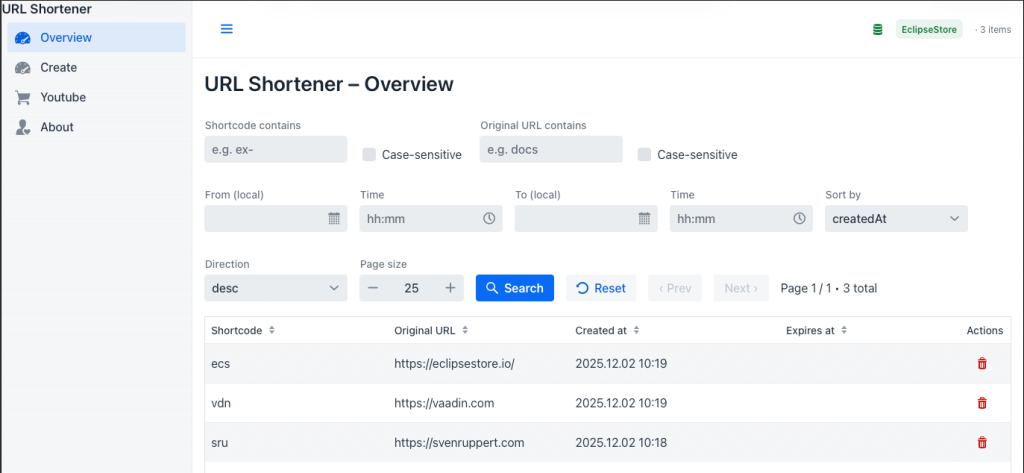
Here’s the screenshot of the version we’re going to implement now.
**Why pure in-memory data is reaching its limits
This volatility was acceptable for early testing, but as the functionality depth increased, clear limits became apparent. In-memory data has three fundamental drawbacks:
- Volatility: Each reboot resets the state – a behaviour that leads to unusable test and production data in real admin systems.
- Missing history: Statistical evaluations or comparisons across sessions are impossible because the state is not persisted over time.
- Invisible state: The user does not see in the UI whether they are working with persistent or volatile memory.
This meant that the application remained technically correct, but operationally incomplete. A real administration interface not only needs functions, but also reliability and transparency about the system status.
**Motivation for the introduction of EclipseStore
This is where EclipseStore comes into play.The project aims to make a seamless transition from in-memory data structures to persistent object graph storage – without ORM, without database, without a break in the architecture.
This makes it perfectly in line with the philosophy of this project: type safety, simplicity and complete control over the data flow.
EclipseStore stores the same object graph that we already use in memory permanently on disk.No mapping, no SQL, no external dependency injection layer – the application remains pure Java. By integrating EclipseStoreUrlMappingStore, the shortener can run in two modes:
- InMemory for quick tests and volatile sessions,
- EclipseStore for productive, persistent runtimes.
This duality not only enables real operational data, but also a clean transition between the development and production environments – an essential aspect if you want to systematically upgrade applications without rewriting them.
**Goal: Permanent storage and live status in the UI
But persistence alone was not the goal of this chapter; it was at least as necessary that the condition became visible. If the server is in persistent mode, the user interface should show this immediately – preferably in real time.
This is precisely where the new status display in the MainLayout comes in: A small icon with colour feedback (green, blue, red) signals whether the system is currently volatile, persistent or unreachable. Underneath are mechanisms that cyclically query the server state, distribute events, and automatically update the UI when the mode changes.

This merges the backend and frontend into a standard, reactive system: The interface no longer becomes just a window on stored data, but a visible mirror of the system state.
This coupling of persistence and UI status forms the foundation for all upcoming enhancements – especially for security, rights management and operational diagnostics.
**The new MainLayout – context and status at a glance
After we have created the theoretical basis in the previous chapter and understood why volatile InMemory data is not sufficient and how EclipseStore enables persistence, we now turn our attention to the user interface. Every architectural decision becomes tangible only when it is reflected in the UI, both visually and functionally.
The most visible expression of this change is in the MainLayout. With the introduction of EclipseStore, it received a new, subtle, but highly effective addition: the StoreIndicator. This small but central component is located in the application header and shows at a glance whether the shortener is currently using a volatile InMemory store or a persistent EclipseStore.
This transforms a previously static header into a dynamic control centre that is not only navigative, but also informative – a visual link between the user interface and the system state.
**Architectural Concept – Visibility as a System Function
In the original Vaadin interface, the header layout consisted only of a title and the navigation structure. The new component now expands this area: between the title “URL Shortener” and the menu, an icon with a label appears, whose colour and text change depending on the memory status.
The concept behind it is deliberately kept minimalist: Status information should not be displayed via dialogues or messages, but should be permanently present , similar to a status bar in professional administration tools.
**Technical integration
The integration was carried out via the existing MainLayout, which serves as the central layout template in Vaadin. There, a StoreIndicator is added when building the header :
var adminClient = AdminClientFactory.newInstance();
var storeIndicator = new StoreIndicator(adminClient);
storeIndicator.getStyle().set("margin-left", "auto"); Align Right
HorizontalLayout headerRow = new HorizontalLayout(toggle, appTitle, new Span(), storeIndicator);
headerRow.setWidthFull();
headerRow.setAlignItems(FlexComponent.Alignment.CENTER);
The StoreIndicator internally uses an AdminClient that periodically queries the server endpoint /store/info. This provides JSON information about the current mode, the number of saved mappings, and the time of server start.
**UI design and colour code
For better orientation, a three-level colour scheme has been introduced:
- 🟢 EclipseStore active: Persistent persistence, data is written to disk.
- 🔵 In-Memory Mode: Volatile memory, suitable for testing and fast development cycles.
- 🔴 Error condition: Connection unreachable or response invalid.
This colour system is implemented consistently with Vaadin’s Lumo design system and ensures that the status indicator blends harmoniously into the UI.
**Effect on user experience
The effect is subtle but profound:
Users can immediately recognise whether they are working with a persistent or a temporary system. At the same time, there is greater trust in the application, as the interface now provides transparency into the system’s status. This aspect is often neglected in professional web applications.
In the next chapter, we will look at how the StoreIndicator works technically: from the polling mechanism to the event architecture to its self-updating in the UI.
**Live Status Component: The StoreIndicator in Detail
After the visible integration in the MainLayout, let’s now turn our attention to the StoreIndicator’s actual functionality**.** This central component displays the system’s state in real time. While the header in the UI provides the context, the StoreIndicator is the heart that makes data movement visible and gives immediate feedback to the user.
**Architecture and Purpose
The StoreIndicator was designed as a standalone Vaadin component that extends HorizontalLayout. It combines logic, display and event control in a clearly defined unit. Their goal: to regularly retrieve the current memory state (InMemory, EclipseStore or error state) and display it visually.
To do this, the component uses periodic polling, which queries the server endpoint /store/info via an AdminClient . The response includes metadata such as memory mode, number of saved mappings, and the time of server startup. Based on this data, the display changes dynamically.
**Lifecycle in the Vaadin UI
When the user interface is attached (onAttach), polling is activated. The UI retrieves the current system information at fixed intervals (every 10 seconds). When removing (onDetach), this background activity is terminated again, keeping the application resource-efficient.
@Override
protected void onAttach(AttachEvent attachEvent) {
    refreshOnce();
    UI ui = attachEvent.getUI();
    ui.setPollInterval(10000); every 10 seconds
    ui.addPollListener(e -> refreshOnce());
}
**Communication with the backend
Communication between the frontend and the backend occurs via the AdminClient. This calls the JSON endpoint /store/info and converts the response to a StoreInfo object:
**StoreInfo info = adminClient.getStoreInfo();
**boolean persistent = “EclipseStore”.equalsIgnoreCase(info.mode());
On this basis, color, icon and text are updated. The visual status is based on three states:
- 🟢 EclipseStore active – persistent storage, data is stored on disks.
- 🔵 InMemory mode – volatile storage, ideal for testing and development.
- 🔴 Error condition – Connection lost or server unreachable.
These states are immediately visible in the UI and follow the colour values of Vaadin’s Lumo theme, which ensures a consistent design.
**Event-Based Update
In addition to polling, the StoreIndicator relies on an event-based notification system. Via StoreEvents.publish(), it sends a global event whenever the storage state changes. Components such as the OverviewView can subscribe to this event and automatically reload when changes are made.
**StoreEvents.publish(new StoreConnectionChanged(newMode, info.mappings()));
This loosely coupled event system avoids direct dependencies between UI components and allows for flexible extensibility – a pattern that can also be applied to other UI areas.
The StoreIndicator, which displays the system’s state in real time, operates resource-efficiently and enhances user confidence in the application. It turns the abstract term “persistence mode” into a visual experience – a perfect example of how backend information can be elegantly integrated into the UI.
Cheers Sven