

In the previous part, we looked at the implementation on the server side. This part is now about the illustration on the user page.
The source code for the initial state can be found on GitHub under https://github.com/svenruppert/url-shortener/tree/feature/advent-2025-day-00 .
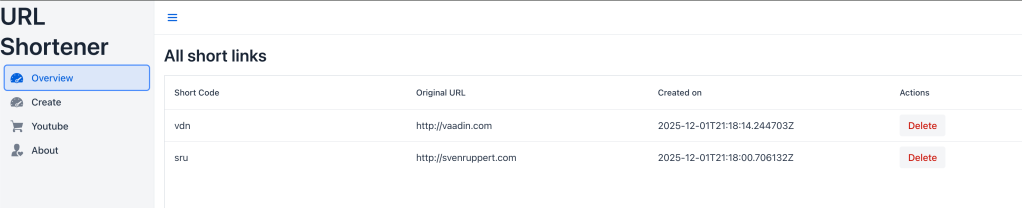
The following screenshot shows this state of development.
The focus of this Advent calendar day is on the introduction of targeted filtering, search and paging functionality on the UI side. The goal is to extend the existing “Overview” view so that users can search specifically for specific shortcodes or URL fragments, restrict time periods and retrieve the results page by page. All the technical foundations for this have been laid in the previous part.
The source code for today’s articles can be found on Github under https://github.com/svenruppert/url-shortener/tree/feature/advent-2025-day-01 .
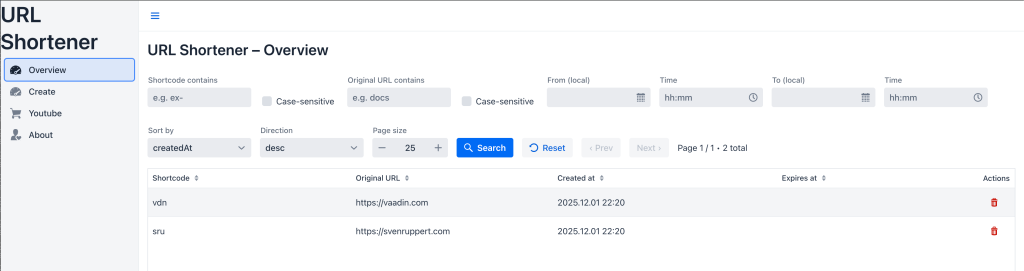
The following screenshot shows the state of development that we will reach today.
Integration into the Vaadin UI#
After implementing the filtering and paging logic on the server and client side, the focus is now on integration into the user interface. The Vaadin UI acts as the visible layer of the system and is crucial to the user experience. The aim of this chapter is to show how the new functions – filtering, searching and page by page – are brought together in a modern, reactive interface.
In contrast to the previous parts, which primarily described technical structures, the focus here is on the interaction between user and system. The OverviewView serves as a central view through which users communicate directly with the API without having to know technical details.
The following sections show how the new API endpoints and client methods create a dynamic yet intuitive interface – from data binding and filter logic to visual fine-tuning and ergonomic design.
OverviewView – Filtering, Searching, and Paging in the Vaadin UI#
With the new server and client functions, the basis for an interactive user interface is now available. This chapter describes the revised OverviewView – the central view of the Vaadin application in which all existing short links can be listed, filtered and managed.
The original version of the View only showed a complete list of all mappings. In the new version, it has been expanded into a dynamic, filterable and page-based interface that communicatesdirectly with the endpoints/listand/list/count.
Structure of the user interface#
The OverviewView combines several input elements to capture search and filter criteria:
- Text fields for shortcode and URL substrings (
codePart,urlPart) - Case-sensitive checkboxes (
codeCase,urlCase) - Date and time selection for time periods (
fromDate,toDate) - Dropdowns for sorting (
sortBy,dir) - Page size via a numeric input field (
pageSize)
In addition, navigation buttons (Prev / Next) enable side control. All input is transferred to a UrlMappingListRequest object, which is passed to the URLShortenerClient when the view is refreshed .
Central logic: DataProvider#
The data supply to the grid is provided by a CallbackDataProvider, which reacts dynamically to user interactions. This calls two methods of the client in the background:
**list()**– loads the actual records of the current page.**listCount()**– determines the total number to control page navigation.
A simplified excerpt of the initialization:
dataProvider = new CallbackDataProvider<>(
    q -> {
        var req = buildFilter(currentPage, pageSize.getValue());
        return urlShortenerClient.list(req).stream();
    },
    q -> {
        var baseReq = buildFilter(null, null);
        totalCount = urlShortenerClient.listCount(baseReq);
        refreshPageInfo();
        return totalCount;
    }
);
This architecture enables the View to react immediately to any change in the filter without having to reload the entire page. The user can conveniently browse through the results, adjust filters or change time periods – the data is loaded live in each case.
UX Improvements#
In addition to the functional enhancement, the user experience has also been improved:
- Responsive layouts: All filter elements arrange themselves flexibly, even with smaller window sizes.
- Automatic page navigation: The
PrevandNext buttonsare automatically deactivated depending on the context. - Date-time combination: Separate DatePicker and TimePicker fields keep input precise and intuitive.
These innovations lead to considerable added value in the daily use of the application: Instead of static tables, there is now an interactive, reactive interface that is both more performant and more ergonomic.
In the next section, we’ll look at the implementation of the paging and filtering logic in detail, including the buildFilter() method and how to handle the parameters in the UI.
Implementation details of the filter logic – buildFilter() and data binding#
The buildFilter() method forms the heart of the new filter mechanics in the Vaadin interface. It collects all of the user’s input—such as text fields, checkboxes, dates, and sorting options—and transfers them to a UrlMappingListRequest object. This request object is then passed on to the client, which uses it to generate the appropriate query parameters for the server.
Structure of the buildFilter() method#
The focus is on the builder structure of the UrlMappingListRequest. The method first reads all UI components, checks for empty fields, and creates a consistent filter object from them:
private UrlMappingListRequest buildFilter(Integer page, Integer size) {
    UrlMappingListRequest.Builder b = UrlMappingListRequest.builder();

    if (codePart.getValue() != null && !codePart.getValue().isBlank()) {
        b.codePart(codePart.getValue());
    }
    b.codeCaseSensitive(Boolean.TRUE.equals(codeCase.getValue()));

    if (urlPart.getValue() != null && !urlPart.getValue().isBlank()) {
        b.urlPart(urlPart.getValue());
    }
    b.urlCaseSensitive(Boolean.TRUE.equals(urlCase.getValue()));

    if (fromDate.getValue() != null && fromTime.getValue() != null) {
        var zdt = ZonedDateTime.of(fromDate.getValue(), fromTime.getValue(), ZoneId.systemDefault());
        b.from(zdt.toInstant());
    } else if (fromDate.getValue() != null) {
        var zdt = fromDate.getValue().atStartOfDay(ZoneId.systemDefault());
        b.from(zdt.toInstant());
    }

    if (toDate.getValue() != null && toTime.getValue() != null) {
        var zdt = ZonedDateTime.of(toDate.getValue(), toTime.getValue(), ZoneId.systemDefault());
        b.to(zdt.toInstant());
    } else if (toDate.getValue() != null) {
        var zdt = toDate.getValue().atTime(23, 59).atZone(ZoneId.systemDefault());
        b.to(zdt.toInstant());
    }

    if (sortBy.getValue() != null && !sortBy.getValue().isBlank()) b.sort(sortBy.getValue());
    if (dir.getValue() != null && !dir.getValue().isBlank()) b.dir(dir.getValue());

    if (page != null && size != null) {
        b.page(page).size(size);
    }

    return b.build();
}
The method works strictly defensively: empty fields are ignored, optional values are only set if they actually exist. The result is always a valid, well-defined request object.
Data flow between UI and server#
The generated filter objects are passed to theURLShortenerClient via the CallbackDataProvider. This generates the query string for the HTTP request. This creates a clear, linear chain:
UI → UrlMappingListRequest → client → /list endpoint → filter → resultsEvery change in the UI – be it a new search, a changed page size or a date filter – automatically triggers a refresh. The Grid component then updates itself with the newly filtered data.
Advantages of encapsulation#
This structure offers several advantages:
- Reusability:
buildFilter()encapsulates all UI logic in one method. - Testability: The result can be easily tested in unit tests without the need for Vaadin-specific classes.
- Extensibility: New filter fields can be easily added as long as they are stored in the builder.
This clean decoupling keeps the Vaadin interface clutter-free, while at the same time achieving deep integration with the API. The buildFilter() method is thus the central node between user interaction and server-side data logic.
Paging and user interaction – control, display, feedback#
The revised OverviewView offers intuitive control for page-by-page navigation through large result sets. The aim is for users to quickly see where they are in the results list, how many elements exist in total and which interactions are currently possible.
Paging elements in the UI#
- Buttons:
Prev(to the previous page) andNext(to the next page). - Page size:
IntegerField pageSizewith min/max limits and step buttons. - Status display:
pageInfoshows e.g. “Page 3 / 12 • 289 total”.
These elements are directly linked to the DataProvider and are updated after each query.
Changing sides and limiting#
Clicking on Prev/Next adjusts the current page, then the View reloads the data:
prevBtn.addClickListener(e -> {
    if (currentPage > 1) {
        currentPage--;
        refresh();
    }
});

nextBtn.addClickListener(e -> {
    int size = Optional.ofNullable(pageSize.getValue()).orElse(25);
    int maxPage = Math.max(1, (int) Math.ceil((double) totalCount / size));
    if (currentPage < maxPage) {
        currentPage++;
        refresh();
    }
});
The page size directly affects the calculation of maxPage. Changes to the pageSize field reset the current page to 1 and trigger a refresh:
pageSize.addValueChangeListener(e -> {
    currentPage = 1;
    grid.setPageSize(Optional.ofNullable(e.getValue()).orElse(25));
    refresh();
});
Status Indicator Update#
The refreshPageInfo() method synchronizes buttons and display with the current data state:
private void refreshPageInfo() {
    int size = Optional.ofNullable(pageSize.getValue()).orElse(25);
    int maxPage = Math.max(1, (int) Math.ceil((double) totalCount / size));
    currentPage = Math.min(Math.max(1, currentPage), maxPage);

    pageInfo.setText("Page " + currentPage + " / " + maxPage + " • " + totalCount + " total");
    prevBtn.setEnabled(currentPage > 1);
    nextBtn.setEnabled(currentPage < maxPage);
}
This prevents the navigation from getting into invalid states (e.g. Prev on page 1 or Next after the last page).
Interaction with list() and listCount()#
- Count (
**listCount**): Determines the total amount (totalCount) without transferring data that does not need to be displayed. - Data (
**list**): Loads only the currently visible subset (based on page/size and current filters).
The combination minimizes network load and ensures consistently fast response times.
UX details and fault tolerance#
- Disable logic: Buttons are
automatically (de)activateddepending on currentPage/maxPage. - Error handling: Network or server errors are
immediately visible viaNotification.show(“Loading failed”). - Reset behavior: The
resetbutton sets filters to default values,currentPageto 1 and triggersrefresh().
These mechanisms create a reactive, robust paging experience that remains clear even with very large amounts of data and provides clear feedback to the user.
UX & styling – visual and ergonomic refinements#
Now that the functionality of the filtering, search and paging mechanisms has been established, this chapter focuses on the fine-tuning of the user interface. The aim is to improve the user experience of the Vaadin interface without changing the technical structure. The focus is on clarity, responsiveness and consistent visual feedback.
Basic design principles#
- Clarity over complexity – Each function (e.g., filtering, sorting, paging) should be visually recognizable without overwhelming the user with options.
- Visual grouping – Logically related items are grouped into horizontal or vertical layouts (e.g., time range, sorting options, search fields).
- Consistent feedback – Every user action (e.g., changing a filter, changing pages, deleting action) receives direct visual or textual feedback.
Exemplary adjustments#
1. Layout structure#
The input elements for filters and paging have been divided into several layout lines:
var filterRow = new HorizontalLayout(
    codePart, codeCase,
    urlPart, urlCase,
    fromGroup, toGroup,
    sortBy, dir
);
filterRow.setDefaultVerticalComponentAlignment(Alignment.END);

var pagingRow = new HorizontalLayout(prevBtn, nextBtn, pageInfo, pageSize);
pagingRow.setDefaultVerticalComponentAlignment(Alignment.CENTER);

add(filterRow, pagingRow, grid);
This division semantically separates filters and navigation and thus improves visual orientation.
2. Color and Theme Consistency#
The buttons now use Vaadin’s own theme variants to convey semantic meaning:
searchBtn.addThemeVariants(ButtonVariant.LUMO_PRIMARY);
resetBtn.addThemeVariants(ButtonVariant.LUMO_CONTRAST);
deleteBtn.addThemeVariants(ButtonVariant.LUMO_ERROR, ButtonVariant.LUMO_TERTIARY);
This immediately signals to the user which actions are primary, neutral or destructive.
3. Responsive behavior#
By using setWrap(true) and percentage widths, the layout is also optimally displayed on smaller screens. Filter elements automatically wrap into new lines without disturbing the overall impression.
filterRow.setWrap(true);
filterRow.setWidthFull();
4. Interactive status messages#
Error and success messages are communicated via Notification.show(). In addition, the affected element can optionally be visually marked – for example, by means of temporary color changes or tooltips.
Notification.show("Short link deleted.");Bringing together function and aesthetics#
These design and ergonomic fine-tunes make the OverviewView a reactive tool for everyday use. The application not only appears technically sophisticated, but also visually conveys the demand for precision and quality.
This completes the implementation of the UI for the new filter and search logic – a basis on which later extensions such as caching, auto-suggest or extended sorting logics can be built.
Conclusion and outlook#
With the implementation of the filter, search and paging functions, the first milestone of the Advent calendar project has been reached. A static overview has become a dynamic, interactive system that allows data to be accessed in a targeted and efficient manner. The basic idea of the project – a solution implemented entirely in Core Java without external frameworks – has been consistently retained.
Review#
This day showed how a clear separation of responsibilities and clean API design can create a solid basis for more complex functionalities:
- Server-side : Introduction of the
UrlMappingFilterand expansion of theInMemoryUrlMappingStorefor structured queries. - Client-side : Extension of the
URLShortenerClientwith type-safe methods for filtering and counting. - UI side : Integration of the new features into the Vaadin-based interface with reactive paging, intuitive navigation and clear user guidance.
The result is a consistent overall system that remains modular, expandable and testable.
Cheers Sven