

With the Vaadin interface described in [Part III], our URL shortener has a fully functional administration console available for the first time. It allows viewing existing short links in tabular form and managing them manually. But after just a few dozen entries, a clear limit becomes apparent: displaying all saved mappings is neither performant nor user-friendly. An efficient shortener must be able to scale – not only when generating, but also when searching through its data.
- Architecture Extension
- Server-side changes
- Introduction to API Endpoints
- Client-side extensions
- Extension of the URLShortenerClient – Filter and Count
- Client Test Coverage – URLShortenerClientListTest
The source code for this status can be found on GitHub at https://github.com/svenruppert/url-shortener/tree/feature/advent-2025-day-00.
The screenshot below shows the status we start with.
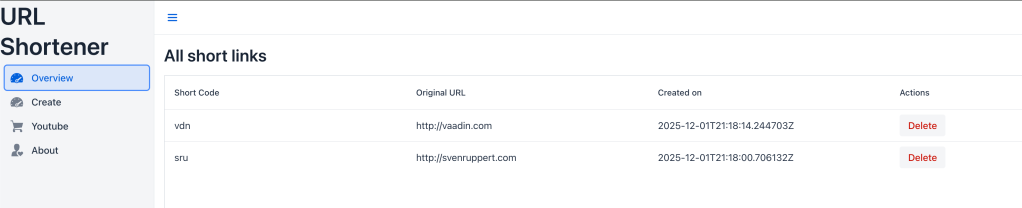
The focus of this first day of the Advent calendar is therefore on introducing targeted filtering, search, and paging functionality. The goal is to extend the existing “Overview” view so that users can search for specific shortcodes or URL fragments, restrict time periods, and retrieve results page by page. All the technical foundations for this have been laid in the previous parts:
- Part I – Short links, clear architecture : A detailed introduction to the motivation, architecture and data model of the project. The article shows how to develop a URL shortener entirely in Core Java, along with the design principles behind it. (https://svenruppert.com/2025/06/10/short-links-clear-architecture-a-url-shortener-in-core-java/ )
- Part II – Deepening the Server Components : This article explores REST handlers, validation, security considerations, and the interaction between the core module and the server layer. (https://svenruppert.com/2025/06/20/part-ii-urlshortener-first-implementation/)
- Part III – The Web UI with Vaadin Flow: This shows how the user interface is structured, how lists, forms, dialogues and validations work, and how Vaadin Flow enables a modern UI without an additional JavaScript stack. (https://svenruppert.com/2025/08/15/part-iii-webui-with-vaadin-flow-for-the-url-shortener/)
The source code for today’s article can be found on Github under https://github.com/svenruppert/url-shortener/tree/feature/advent-2025-day-01.
The following screenshot shows the development status shown in it.
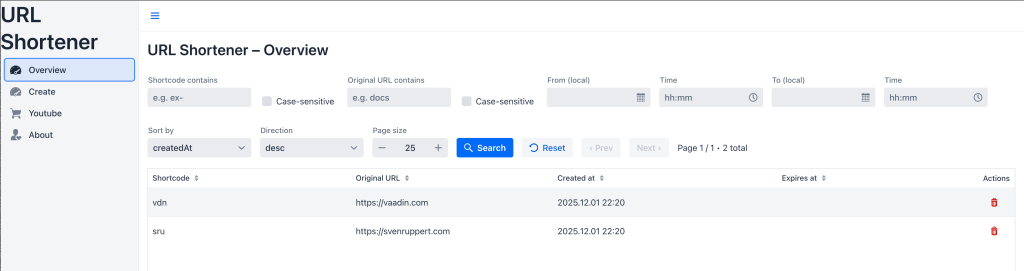
It is important that we do not introduce framework magic , but consistently expand the existing system with the JDK’s on-board resources. Every new class, additional parameter, and API detail follows the same principles as before: clarity, type safety, and transparency. The changes are deliberately incremental – they do not replace existing functions, but expand them in a controlled manner.
Below, we’ll take a step-by-step look at how this new layer was introduced: from the server-side filtering model to the extended REST endpoint and integration with the Vaadin UI. All new code sections are explicitly highlighted so that the differences to the previous parts can be clearly understood.
Architecture Extension#
The module structure established in the previous parts is completely retained: core , api , client and ui-vaadin continue to form the central layers of the system. However, there is a new logical level between the REST endpoint and the data storage: the filter model. It allows you to describe what data the server is supposed to deliver precisely – and no longer just that it returns all existing mappings.
This architectural principle follows the responsibility separation principle described in [Part II]: Each layer should do precisely what is within its responsibility. The REST API receives requests, converts them into type-safe filter objects, and passes them to the store. The store, in turn, does the actual searching, sorting, and page layout. The UI only uses filtered results, which keeps it lightweight and responsive.
The new architecture can therefore be understood as a small but decisive extension of the previous data flow:
[UI] → [Client] → [API] → [Filter Model] → [Store]
Previously, communication between the UI and the API was mainly in the form of complete data lists; now, queries with parameters are transmitted in a targeted manner. These parameters describe search patterns, time periods, sorting, and paging information. The result is a much more flexible and high-performance interaction that fits seamlessly into the existing system.
Conceptually, care was taken to ensure that all new components could be integrated incrementally. No existing function will be changed or replaced. Instead, clients that continue to use the legacy endpoints (e.g. /list/all) do so unchanged. New clients – such as the revised OverviewView – on the other hand, immediately benefit from the extended filter options.
This decoupling not only ensures stability during operation but also forms the basis for future extensions, such as persistent filters or server-side search indexes. The following sections now show in concrete terms how this architecture was technically implemented.
Server-side changes#
After the architecture has been defined stably in the previous parts, this section focuses on extending the server-side. The goal is to complement the existing REST endpoints so that they can deliver filtered, sorted, and paginated results in a targeted manner. The previous URL shortener structure has not changed, but has been expanded into clearly defined modules.
The following subchapters describe the main new building blocks – from the central UrlMappingFilter to the revised handlers and the helper classes that handle parsing and data processing.
UrlMappingFilter – the new filter model#
To enable targeted searches, a new class has been introduced: UrlMappingFilter. It forms the heart of the server-side extension and defines all the parameters that precisely describe a query – from text fragments and date ranges to sorting and paging.
The structure consistently follows the type-safe API construction principle established in [Part II]. Instead of evaluating unstructured query parameters directly in the handler, UrlMappingFilter encapsulates all possible filter options in a clearly defined object. This keeps the REST logic lean and the code easier to test.
A typical filter object might look like this:
var filter = UrlMappingFilter.builder()
    .codePart("ex-")
    .urlPart("docs")
    .createdFrom(Instant.parse("2025-10-01T00:00:00Z"))
    .limit(25)
    .sortBy(SortBy.CREATED_AT)
    .direction(Direction.DESC)
    .build();
Here, only the parameters relevant to a specific query are provided as examples. Unset values remain null or empty, which makes the builder particularly flexible. The class itself is immutable – once it has been created, it cannot be changed.
The most important features at a glance:
- codePart, urlPart: Text-based filtering (substrings, optional case-sensitive)
- createdFrom, createdTo: Time constraint of the result
- offset, limit: Paging control (start index and number of records)
- sortBy, direction: Sort criteria (e.g. CREATED_AT or SHORT_CODE)
This clear structure allows the store to apply filters efficiently and easily integrate future extensions (such as status or user). It does not replace the existing search mechanism, but expands it modularly. Existing functions such as findAll() are retained.
The use of an explicit builder pattern ensures that filter objects can only be created in valid combinations. This principle has already proven itself with the ShortenRequest and ShortUrlMapping classes. In addition, consistent use of optional and explicit data types prevents empty strings or incorrect values from interfering with the filtering process.
This provides a basis for receiving requests in a structured format via the REST API and forwarding them to the store in a targeted manner. The following section shows how these filter objects are used within the ListHandler .
ListHandler - Extended GET Endpoint (/list)#
The previous implementation of the ListHandler in [Part II] primarily returned all stored mappings as a static list. As the data stock grew, this was neither performant nor differentiated enough. As part of the new filter architecture, the handler has therefore been fundamentally expanded –without changing its previous endpoints. Existing calls such as /list/all or /list/expired will continue to work unchanged.
The new code path now recognises requests to the /list endpoint and interprets the query parameters. These are transferred to a UrlMappingFilter object and then passed to the store. The store then returns the filtered and sorted subset.
An excerpt from the new method:
private String listFiltered(HttpExchange exchange) {
    var query = parseQueryParams(exchange.getRequestURI().getRawQuery());

    int page = parseIntOrDefault(first(query, "page"), 1);
    int size = clamp(parseIntOrDefault(first(query, "size"), 50), 1, 500);
    int offset = Math.max(0, (page - 1) * size);

    var sortBy = parseSort(first(query, "sort"));
    var dir = parseDir(first(query, "dir"));

    boolean codeCase = Boolean.parseBoolean(first(query, "codeCase"));
    boolean urlCase = Boolean.parseBoolean(first(query, "urlCase"));

    var filter = UrlMappingFilter.builder()
        .codePart(first(query, "code"))
        .codeCaseSensitive(codeCase)
        .urlPart(first(query, "url"))
        .urlCaseSensitive(urlCase)
        .createdFrom(parseInstant(first(query, "from"), true).orElse(null))
        .createdTo(parseInstant(first(query, "to"), false).orElse(null))
        .offset(offset)
        .limit(size)
        .sortBy(sortBy.orElse(null))
        .direction(dir.orElse(null))
        .build();

    int total = store.count(filter);
    var results = store.find(filter);
    var items = results.stream().map(m -> toDto(m, Instant.now())).toList();

    return JsonUtils.toJsonListingPaged("filtered", items.size(), items, page, size, total, sortBy.orElse(null), dir.orElse(null));
}
This method illustrates how cleanly the new filter logic integrates into the existing retailer. Instead of returning a complete list, it now creates a paged response object that contains additional metadata:
{
  "mode": "filtered",
  "page": 2,
  "size": 25,
  "total": 123,
  "sort": "createdAt",
  "dir": "desc",
  "count": 25,
  "items": [ { ... }, { ... } ]
}
This format offers two decisive advantages: On the one hand, the UI can work specifically with pagination, and on the other hand, API clients can be extended by further parameters in the future without breaking existing structures.
The trader must continue to pay attention to backward compatibility. All older endpoints are registered in the same context and continue to return complete JSON lists. Only /list uses the extended schema.
The ListHandler thus becomes the central intermediary between the API request and data filtering – it serves as the “translator” between HTTP parameters and the internal filter model. The following section shows how the supplemental counting endpoint /list/count uses the same logic for pure quantity queries.
ListCountHandler - Lightweight counting endpoint (/list/count)#
In parallel with the extended /list endpoint, an additional handler, ListCountHandler, has been introduced. Its task is to provide only the total number of hits for a given filter configuration – without returning the actual data sets. This separation was deliberately chosen to make paging operations in the UI efficient.
In contrast to ListHandler, the counting endpoint does not return complete JSON objects with shortcodes and URLs, but only a compact counter value. This allows the client to determine in advance how many pages a query contains before loading individual data pages.
An excerpt from the implementation shows the simplicity of the approach:
@Override
public void handle(HttpExchange exchange) throws IOException {
    if (!" GET".equalsIgnoreCase(exchange.getRequestMethod())) {
        exchange.sendResponseHeaders(405, -1);
        return;
    }

    Map<String, List<String>> q = parseQuery(Optional.ofNullable(exchange.getRequestURI().getRawQuery()).orElse(""));

    UrlMappingFilter filter = UrlMappingFilter.builder()
        .codePart(first(q, "code"))
        .codeCaseSensitive(bool(q, "codeCase"))
        .urlPart(first(q, "url"))
        .urlCaseSensitive(bool(q, "urlCase"))
        .createdFrom(parseInstant(first(q, "from")).orElse(null))
        .createdTo(parseInstant(first(q, "to")).orElse(null))
        .build();

    int total = store.count(filter);
    byte[] body = ("{\"total\":" + total + "}").getBytes(StandardCharsets.UTF_8);

    exchange.getResponseHeaders().add("Content-Type", "application/json; charset=utf-8");
    exchange.sendResponseHeaders(200, body.length);
    try (OutputStream os = exchange.getResponseBody()) {
        os.write(body);
    }
}
The method remains minimalist: no paging, no sorting, no additional data. It uses the same parameters as the ListHandler, so both endpoints behave consistently. The only difference is in the return format – a deliberate design for efficiency and clear accountability.
An example of a typical client request:
GET /list/count?code=ex-&url=docs
→ { “total”: 42 }
The client (e.g. the Vaadin UI) can use this information to calculate the maximum number of pages and dynamically enable or disable the navigation buttons. This prevents unnecessary data transfer when the user only wants to know how many entries a filter currently delivers.
This lean endpoint lays the foundation for high-performance paging. The next step shows how the store responds internally to these filter requests and efficiently determines the results.
InMemoryUrlMappingStore – Filtering, sorting, and paginating#
The InMemoryUrlMappingStore, which already served as a simple storage solution in [Part II], has now been extended by a powerful filter logic. The goal is to process targeted queries directly in memory using the new UrlMappingFilter, including sorting and paging. The code remains easy to understand and test, as no external database is used.
Compared to the original variant, which provided only findAll(), the new implementation has two central extensions:
- find(UrlMappingFilter filter) – returns a filtered, sorted, and paginated list of results.
- count(UrlMappingFilter filter) – determines the number of elements that correspond to a given filter.
An excerpt shows the core of the new logic:
@Override
public List<ShortUrlMapping> find(UrlMappingFilter filter) {
    Objects.requireNonNull(filter, "filter");

    List<ShortUrlMapping> tmp = new ArrayList<>();
    for (ShortUrlMapping mapping : store.values()) {
        if (matches(filter, mapping)) tmp.add(mapping);
    }

    Comparator<ShortUrlMapping> cmp = buildComparator(filter);
    if (cmp != null) {
        tmp.sort(cmp);
        if (filter.direction().orElse(Direction.ASC) == Direction.DESC) {
            Collections.reverse(tmp);
        }
    }

    int from = Math.max(0, filter.offset().orElse(0));
    int lim = filter.limit().orElse(Integer.MAX_VALUE);
    if (from >= tmp.size()) return List.of();
    int to = Math.min(tmp.size(), from + Math.max(0, lim));
    return tmp.subList(from, to);
}
The process is divided into three phases:
- Filter – matches(filter, mapping) checks substrings (with optional case sensitivity) as well as time periods (createdFrom, createdTo).
- Sort – the Comparator construct allows sorting by CREATED_AT, SHORT_CODE, ORIGINAL_URL, or EXPIRES_AT.
- Paging – offset and limit return only the requested subsets.
An example illustrates the effect:
Filter: codePart=“ex-”, sortBy=CREATED_AT, direction=DESC, offset=0, limit=5
Result: The five most recent shortcodes that start with “ex-”.
The count(filter) method , on the other hand, is deliberately trivial:
@Override
public int count(UrlMappingFilter filter) {
    int c = 0;
    for (ShortUrlMapping m : store.values()) {
        if (matches(filter, m)) C++;
    }
    return c;
}
This keeps the semantics consistent: count() and find() use the same filter logic, but differ in the return form. This allows pagination information to be reliably calculated.
A key design goal was backward compatibility : the original findAll() method remains unchanged. If no filter is passed, find() can fall back on it internally. Thus, older parts of the application continue to work unchanged.
The expansion of the store is an example of how more complex search mechanisms can be implemented using simple Java constructs – type-safe, transparent, and without additional dependencies. The following section shows how this logic is specifically supported and validated by QueryUtils.
QueryUtils – Parsing and Normalising Query Parameters#
To enable REST endpoints to respond cleanly and robustly to parameter requests, a small helper class, QueryUtils, has been introduced. It converts raw query strings from HTTP requests into type-safe values. This step relieves the handler classes (ListHandler and ListCountHandler) and at the same time ensures uniform behavior when dealing with user parameters.
The class is located in the package com.svenruppert.urlshortener.api.utils and is purely static. Their purpose is to catch erroneous input, set default values, and convert strings into concrete enums or numbers. This prevents incomplete or incorrect query parameters from causing exceptions or leading to inconsistent states.
An excerpt from the implementation:
public final class QueryUtils {

  private QueryUtils() { }

  public static int parseIntOrDefault(Strings s, int def) {
    try {
      return (s == null || s.isBlank()) ? def: Integer.parseInt(s.trim());
    } catch (NumberFormatException e) {
      return def;
    }
  }

  public static int clamp(int v, int lo, int hi) {
    return Math.max(lo, Math.min(hi, v));
  }

  public static Optional<UrlMappingFilter.SortBy> parseSort(Strings) {
    if (s == null) return Optional.empty();
    return switch (s.toLowerCase(Locale.ROOT)) {
      case "createdat" -> Optional.of(UrlMappingFilter.SortBy.CREATED_AT);
      case "shortcode" -> Optional.of(UrlMappingFilter.SortBy.SHORT_CODE);
      case "originalurl" -> Optional.of(UrlMappingFilter.SortBy.ORIGINAL_URL);
      case "expiresat" -> Optional.of(UrlMappingFilter.SortBy.EXPIRES_AT);
      default -> Optional.empty();
    };
  }

  public static Optional<UrlMappingFilter.Direction> parseDir(Strings) {
    if (s == null) return Optional.empty();
    return switch (s.toLowerCase(Locale.ROOT)) {
      case "asc" -> Optional.of(UrlMappingFilter.Direction.ASC);
      case "desc" -> Optional.of(UrlMappingFilter.Direction.DESC);
      default -> Optional.empty();
    };
  }
}
This small utility class does several things at once:
- Resilience: Incorrect or missing parameters never lead to exceptions.
- Consistency: Sorting and direction are interpreted consistently throughout the system.
- Maintainability: Traders no longer have to worry about low-level parsing.
Clamping (clamp(pageSize, 1, 500)) is a crucial security feature: it prevents oversized queries and thus protects both the server and the UI from excessive data volume.
An example illustrates the practical effect:
Input: size=-5 → Result: size=1
Input: size=9999 → Result: size=500
This makes QueryUtils an inconspicuous but essential part of API robustness. Its features follow the same guiding principle that runs through the entire project: explicit typing, clear boundaries, and defensive processing.
Introduction to API Endpoints#
Now that the server-side logic has been extended to include filtering, sorting and paging, the REST API itself is now taking centre stage. It serves as the link between the internal functions of the URL shortener and the client’s or UI’s external access. This chapter aims to describe the new and extended endpoints in detail and explain their functions within the overall system.
The focus is not only on the data format of the answers, but also on the semantics of the supported parameters. Both aspects are crucial to make filter queries consistent, comprehensible and efficient. Thanks to a clearly structured API, both existing clients can continue to work, and new components – such as the Vaadin-based administration interface – can access subsets of data in a targeted manner without overloading the system.
Structure of the new endpoints#
With the introduction of filtering and paging, the REST API for the URL shortener has also been extended. In addition to the familiar endpoints from [Part II], two new paths are now available that are specifically designed for targeted queries:
GET /list – returns filtered and paginated results


GET /list/count – returns only the number of hits
Both endpoints use the same set of query parameters. While /list returns the actual mappings in structured JSON, /list/count provides a lightweight way to determine the total set for a query. This separation deliberately follows the single-responsibilityprinciple and, at the same time, supports high-performance UIs that load pages and large amounts of data.
A typical call to the new /list endpoint might look like this:
GET /list?code=ex-&url=docs&page=2&size=25&sort=createdAt&dir=descThe result is a JSON object with the following keys:
{
  "mode": "filtered",
  "page": 2,
  "size": 25,
  "total": 123,
  "sort": "createdAt",
  "dir": "desc",
  "count": 25,
  "items": [
    {
      "shortCode": "ex-beta",
      "originalUrl": "https://example.org/blog",
      "createdAt": "2025-10-24T12:45:33Z",
      "expiresAt": "",
      "Status": "Active"
    }
  ]
}
The JSON structure follows a clear logic: all metadata for the request is in the first fields, while the items array contains the actual results. This makes it easy to integrate the structure into UI components such as tables, grids or data providers.
Compatibility and stability#
Existing endpoints such as /list/all, /list/active, and /list/expired are fully preserved. They continue to provide unchanged responses, so existing clients don’t need any customisations. The new endpoints are therefore integrated additively into the system.
For new clients, especially those using the Vaadin UI presented in [Part III], the introduction of these endpoints provides a basis for reactive data display. Instead of loading all mappings at once, the interface can request only the data sets defined by the current filter.
This API structure lays the foundation for detailing the supported parameters and their meanings in the following subchapters.
Supported Parameters#
The new endpoints /list and /list/count accept a set of query parameters that can be used to formulate targeted search and filter queries. All parameters are optional and can be freely combined. Unset fields do not impose any restrictions.
| Parameter | Type | Description |
|---|---|---|
code | String | Substring of the short code. Is handled by default case-insensitive if codeCase=true is not set. |
codeCase | Boolean | Controls whether the search for shortcodes should be case-sensitive. |
URL | String | Substring within the original URL. Similar to code, the case can be controlled via urlCase. |
urlCase | Boolean | Case sensitivity switch for URL search. |
from | ISO-8601 timestamp | Lower limit of the creation period (inclusive). Also accepts dates without a time component. |
To | ISO-8601 timestamp | Upper limit of the creation period (included). |
page | Int | 1-based page number. Default value: 1. |
Size | Int | Number of records per page. Values outside the range 1-500 are automatically limited. |
sort | String | Sort. Allowed are: createdAt, shortCode, originalUrl, expiresAt. |
you | String | Sorting direction: asc or desc. Default value: asc. |
For example, a complete request might look like this:
GET /list?code=ex-&url=docs&from=2025-10-01T00:00:00Z&to=2025-10-25T23:59:00Z&page=2&size=25&sort=createdAt&dir=descThe API validates all parameters using the QueryUtils class. Invalid or missing values are replaced with default values to avoid exceptions. This defensive strategy ensures a high level of stability in continuous operation.
Interaction of the parameters#
- If neither
codenorurlis set, all mappings are taken into account. fromandtodefine an inclusive period ; both fields may be set independently of each other.pageandsizeonly affect the display of results, not the count in/list/count.- Combinations of
sortanddirhave a consistent effect on both endpoints (/listand/list/count).
A minimalist example of a count-only query is:
GET /list/count?url=example


→ { "total": 12 }
The API is designed so that future parameters can be easily added. Thanks to the central UrlMappingFilter, new fields need only be stored there and taken into account in the builder. This completely preserves the system’s extensibility.
Client-side extensions#
After the server-side has been extended with flexible filtering and paging functions, the client-side customisation now follows. This chapter aims to demonstrate how the new data retrieval capabilities have been integrated into the existing URLShortenerClient without altering its structure or semantics.
The focus is on type-safe communication between the client and the server. Instead of assembling manual query strings or passing loose maps, the new builder UrlMappingListRequest encapsulates all parameters in a clear, object-oriented form. On this basis, filters, sorting and paging can be centrally managed and easily tested.
The chapter highlights the three main aspects of client extension:
- The new request builder (
UrlMappingListRequest), which cleanly encapsulates filter and paging parameters. - The advanced methods in the
**URLShortenerClient**process these requests and forward them to the new endpoints. - The associated test class that secures the interaction between client and server.
Together, these elements serve as the counterpart to the server-side extensions from the chapter “Server-side changes” and provide the basis for an interactive user interface that works specifically with filtered and paginated data.
UrlMappingListRequest – Filter and Paging Request Builder#
To enable the client to communicate with the new filter and paging endpoints in a targeted manner, the UrlMappingListRequest class was introduced. It acts as a transportable request object that contains all relevant parameters and, if necessary, translates them into a query string for HTTP communication.
The design follows the principles from [Part II]: no external JSON serialisation, no dependencies on frameworks – instead pure Java logic with a focus on readability and type safety.
An example illustrates the usage:
var req = UrlMappingListRequest.builder()
    .urlPart("docs")
    .page(2)
    .size(25)
    .sort("createdAt")
    .dir("desc")
    .build();
The class then converts this information into a URL query string that can be sent directly to the server:
/list?url=docs&page=2&size=25&sort=createdAt&dir=descInternally, UrlMappingListRequest consists of a set of simple fields, such as codePart, urlPart, from, to, page, size, sort, and dir. The integrated builder ensures that only valid combinations can be formed. Unset values are automatically ignored during serialisation – empty parameters do not appear in the query string.
Two methods are central:
**toQueryString()**– generates the complete query string including paging and sorting parameters.**toQueryStringForCount()**– returns only the filter parameters, without paging or sorting information, for/list/count.
Both variants are based on an internal helper method that checks parameters, sorts them by key, and securely encodes them via URLEncoder:
private static String toQuery(Map<String, String> params) {
    return params.entrySet().stream()
        .map(e -> enc(e.getKey()) + "=" + enc(e.getValue()))
        .collect(Collectors.joining("&"));
}
This structure ensures that all parameters are transmitted cleanly and in accordance with the URL format – a detail particularly essential for strings containing special characters (e.g., in URLs).
Thus, UrlMappingListRequest forms the direct bridge between the client and the API. It does not replace existing calls, but expands the communication options with flexible, type-safe filter queries – in line with the modular system design.
Extension of the URLShortenerClient – Filter and Count#
On the client side, the URLShortenerClient has been enhanced with two essential features to target the new server-side endpoints: list(UrlMappingListRequest request) and listCount(UrlMappingListRequest request). These methods enable dynamic reaction to filter criteria without manual URL assembly.
New methods#
The implementation follows the principle of clear separation of responsibilities: list() handles the actual data, listCount() handles the metadata.
public List<ShortUrlMapping> list(UrlMappingListRequest request)
    throws IOException {
    final String json = listAsJson(request);
    return parseItemsAsMappings(json);
}

public int listCount(UrlMappingListRequest req)
    throws IOException {
    String qs = (req == null) ? "" : req.toQueryStringForCount();
    var uri = qs.isEmpty()
        ? serverBaseAdmin.resolve(PATH_ADMIN_LIST_COUNT)
        : serverBaseAdmin.resolve(PATH_ADMIN_LIST_COUNT + "?" + qs);

    var con = (HttpURLConnection) uri.toURL().openConnection();
    con.setRequestMethod("GET");
    con.setRequestProperty("Accept", "application/json");

    int sc = con.getResponseCode();
    if (sc != 200) {
        String err = readAllAsString(con.getErrorStream() != null ? con.getErrorStream() : con.getInputStream());
        throw new IOException("Unexpected HTTP " + sc + " for " + uri + " body=" + err);
    }
    try (var is = con.getInputStream()) {
        String body = readAllAsString(is);
        int i = body.indexOf("\"total\"");
        if (i < 0) return 0;
        int colon = body.indexOf(':', i);
        int end = body.indexOf('}', colon + 1);
        String num = body.substring(colon + 1, end).trim();
        return Integer.parseInt(num);
    } finally {
        con.disconnect();
    }
}
Significance of enlargement#
These two methods make the client fully compatible with the advanced server features. The filter logic is completely mapped via the UrlMappingListRequest object, so that the call itself always remains clear:
var req = UrlMappingListRequest.builder()
    .codePart("ex-")
    .urlPart("docs")
    .page(1)
    .size(25)
    .build();

List<ShortUrlMapping> results = client.list(req);
int total = client.listCount(req);
The client can therefore first query the total amount to calculate pagination, then load only the relevant data pages. This significantly reduces the network load, especially with large amounts of data.
Backward compatibility#
All existing methods such as listAllAsJson() or listActiveAsJson() are preserved. This keeps the API binary and semantically compatible – existing tests and applications continue to work. The new functions fit seamlessly into the existing design and, at the same time, form the basis for a reactive UI that can dynamically evaluate filters and paging.
Client Test Coverage – URLShortenerClientListTest#
To secure the new client functions, a separate test class, URLShortenerClientListTest, has been introduced. It checks the interaction between the client and a running ShortenerServer and thus serves as an integration test for the entire filter and paging chain.
The test starts a whole server on a random port and then communicates with the real HTTP endpoint. This ensures that not only the client logic, but also the serialisation, request routing, and server-side filtering work correctly.
An excerpt from the test case:
@Test
@Order(1)
void list_all_and_filtered_by_code_and_url_and_date() throws Exception {
    Arrange
    var t0 = Instant.now();

    ShortUrlMapping m1 = client.createCustomMapping("ex-alpha", "https://example.com/docs");
    Thread.sleep(10);
    ShortUrlMapping m2 = client.createCustomMapping("ex-beta", "https://example.org/blog");
    Thread.sleep(10);
    ShortUrlMapping m3 = client.createMapping("https://docs.example.com/page");

    var t1 = Instant.now();

    Act – test different filters
    var reqCode = UrlMappingListRequest.builder().codePart("ex-").build();
    List<ShortUrlMapping> byCode = client.list(reqCode);
    assertTrue(byCode.size() >= 2);

    var reqUrl = UrlMappingListRequest.builder().urlPart("docs").build();
    List<ShortUrlMapping> byUrl = client.list(reqUrl);
    assertTrue(byUrl.stream().anyMatch(m -> m.originalUrl().contains("docs")));

    var reqDate = UrlMappingListRequest.builder().from(t0).to(t1).build();
    List<ShortUrlMapping> byDate = client.list(reqDate);
    assertFalse(byDate.isEmpty());
}
The test examines three central use cases:
- Code filtering – only shortcodes that start with a specific pattern.
- URL filtering – URLs that contain specific substrings.
- Time Filtering – Entries created within a specific time window.
Paging and sorting tests#
A second test section focuses on pagination and sorting:
@Test
@Order(2)
void list_pagination_and_sorting() throws Exception {
    for (int i = 0; i < 10; i++) {
        client.createMapping("https://example.net/page-" + i);
        Thread.sleep(2);
    }

    var req = UrlMappingListRequest.builder()
        .page(2).size(5)
        .sort("createdAt").dir("desc")
        .build();

    List<ShortUrlMapping> page2 = client.list(req);
    assertEquals(5, page2.size());
    for (int i = 1; i < page2.size(); i++) {
        assertTrue(!page2.get(i).createdAt().isAfter(page2.get(i - 1).createdAt()));
    }
}
This checks that page numbering is working correctly and that the results are returned in the expected order.
Aim of the tests#
This test class ensures that the interaction between client and server remains stable, even if parameter combinations change. By using a real HttpServer backend, a realistic environment is simulated, without external dependencies. The result is a high level of trust in the implementation with full coverage of all critical paths.
The URLShortenerClientListTest class thus concludes the client chapter: It proves that the system as a whole – from filter definition to HTTP communication to result processing – functions consistently.
In the next part, we will then look at the integration into the Vaadin UI.
Cheers Sven