

What has happened so far?#
In the first part of this article, the new active/inactive model for shortlinks was introduced and anchored at the architectural level. Based on the technical rationale, it was shown that a pure expiration date is insufficient for modern use cases and that an explicit activity status is required.
Based on this, the technical foundations were laid: the core domain model was extended with an active flag, the DTOs were adapted accordingly, and the serialisation was designed to ensure backward compatibility. In addition, the administrative REST endpoints have been expanded to enable targeted setting, querying, and filtering of activity status. The redirect behaviour has also been clarified so that deactivated and expired shortlinks can be distinguished by clearly defined HTTP status codes.
The structural basis of the active/inactive model is thus fully established. In the second part, the focus is on practical use: how the Java client maps these new capabilities, how users can conveniently control activity status via the Vaadin interface, and how this results in consistent, efficient workflows in everyday use.
The source code for this project‘s status can be found on GitHub at the following URL:https://github.com/svenruppert/url-shortener/tree/feature/advent-2025-day-10
Java Client Enhancements#
After the server API had been extended to include functions for activating and deactivating shortlinks, the Java client also had to be adapted accordingly. After all, it is the primary interface for many users to work programmatically with the URL shortener – whether in the context of desktop tools, automations, CI/CD pipelines or embedded systems.
Chapter 5 details how new capabilities have been added to the client to support the active/inactive model fully. These include:
- the targeted switching of the activity status,
- the initial setting of the activity and expiration date when creating a shortlink,
- as well as editing existing mappings, including the new activity field.
The extensions are based on a consistent design approach: simple parameters, clear method focus, strict validation, and traceable error handling. For users, this creates an API that is not only complete, but also intuitive to use – regardless of whether individual values are changed or complete mappings are rebuilt.
New API: toggleActive(shortCode, active)#
To allow the user to control the activity status of a shortlink not only via the REST API, but also conveniently via the Java client, a new method has been added to the client API. This method is the functional equivalent of the toggle endpoint on the server side and allows shortlinks to be enabled or disabled directly from applications, scripts, or automations.
The new API method toggleActive(shortCode, active) does exactly this. It ensures that all relevant information is transmitted to the server in the correct structure and that the server’s response is converted into a suitable representation. With a clear focus on switching activity status, the user eliminates the need to build full update objects or send unnecessary data.
Another advantage of this method is its simplicity: the user only needs to specify the shortcode of the link to be changed as well as the desired new status. The client’s internal logic takes care of everything else – from creating the appropriate request payload to interpreting the server response. This makes it particularly intuitive to use and reduces potential sources of error.
In the next step, we will look at the concrete implementation of this method using the source code. The following implementation comes directly from the URLShortenerClient:
public boolean toggleActive(String shortCode, boolean active)
      throws IOException {
    logger().info("Toggle Active shortCode='{}' active='{}'", shortCode, active);
    if (shortCode == null || shortCode.isBlank()) {
      throw new IllegalArgumentException("shortCode must not be null/blank");
    }
    final URI uri = serverBaseAdmin.resolve(PATH_ADMIN_TOGGLE_ACTIVE + "/" + shortCode);
    final URL url = uri.toURL();
    logger().info("Toggle Active - {}", url);

    final HttpURLConnection con = (HttpURLConnection) url.openConnection();
    con.setRequestMethod("PUT");
    con.setDoOutput(true);
    con.setRequestProperty(CONTENT_TYPE, JSON_CONTENT_TYPE);
    con.setRequestProperty(ACCEPT, APPLICATION_JSON);
    con.setConnectTimeout(CONNECT_TIMEOUT);
    con.setReadTimeout(READ_TIMEOUT);

    var req = new ToggleActiveRequest(shortCode, active);

    final String body = toJson(req);
    logger().info("Toggle Active - request body - '{}'", body);
    try (OutputStream os = con.getOutputStream()) {
      os.write(body.getBytes(UTF_8));
    }

    final int code = con.getResponseCode();
    logger().info("Toggle Active - responseCode {}", code);

    if (code == 200 || code == 204 || code == 201) {
      drainQuietly(con.getInputStream());
      return true;
    }

    if (code == 404) {
      logger().info("shortCode not found.. {}", shortCode);
      drainQuietly(con.getErrorStream());
      return false;
    }
    final String err = readAllAsString(con.getErrorStream());
    throw new IOException("Unexpected response: " + code + ", body=" + err);
}
The method starts with basic validation and logging. The shortCode parameter must be set because it uniquely identifies the shortlink to change. If the value is null or empty, the client throws an IllegalArgumentException even before an HTTP call is made.
The next step is to create the destination URL for the API call. The server’s administrative base path (serverBaseAdmin) is combined with the toggle endpoint path segment. Thanks to this dynamic composition, the client remains flexible in different deployment environments.
The client then opens an HTTP connection and configures it for a PUT request. The method sets the expected header fields, including Content-Type (for JSON) and Accept, to define the expected response type. setDoOutput(true) indicates that a request body is included in the request.
For the actual payload, an instance of ToggleActiveRequest is created, which consists of a shortCode and the desired new active state. This structure is serialized using toJson and then written to the output stream of the connection.
After the request is sent, the method reads the HTTP status code via con.getResponseCode(). The implementation distinguishes between three main cases:
- Successful state change (200, 204, or 201): The method flushes the InputStream via
drainQuietlyand returnstrue. This signals to the user that the shortlink has been updated successfully. - Shortlink not found (404): Again, the ErrorStream is emptied. However, the method returns
falseto make it clear to the user that the shortlink does not exist and therefore cannot be updated. - All other error cases : In the event of unexpected or erroneous responses, the ErrorStream is read and packaged together with the HTTP status code in an
IOException. This forces the calling code to handle unforeseen errors and prevents such states from being silently ignored.
Thus, toggleActive provides a clearly defined, robust API for switching activity status via the Java client. It follows the same design principles as the client’s other methods: clear validation, consistent error handling, meaningful logging, and lean, JSON-based communication. The implementation thus integrates seamlessly into the existing client architecture and provides a simple yet effective extension of functionality.
Advanced createCustomMapping(...)#
In addition to the possibility to activate or deactivate existing shortlinks afterwards, the process for creating new shortlinks has also been expanded. To allow users to determine whether a shortlink is active when making it, the createCustomMapping(...) method is used in the Java client.
Before this adjustment, a shortlink could be created using only its fundamental properties – shortcode, original URL, and optional expiration date. The activity status was set implicitly or could only be controlled via later processing steps. With the new extension, the user can determine during creation whether a shortlink is active or inactive.
The method follows the same principles as the client’s other functions: it focuses on clear, simple, and reliable communication with the server. The user only provides the required input values. At the same time, the client takes care of the entire technical processing of the request – from creating the request object to JSON serialisation and interpreting the server response.
This expansion allows new use cases to be realised. For example, a shortlink can already be created, but only activated later – for example, synchronously with a release time, a marketing campaign or automatically in CI/CD pipelines. At the same time, the uniform data structure ensures that the activity status of a shortlink is treated consistently both when creating and editing.
In the next step, we examine the concrete implementation of this method using the relevant source code sections and analyse how the extended parameters are integrated into the creation process.
The extension appears in the URLShortenerClient in the form of two overloaded methods: a simple variant and an extended version with expiration and activity parameters:
public ShortUrlMapping createCustomMapping(String alias, String url)
      throws IOException {
    logger().info("Create custom mapping alias='{}' url='{}'", alias, url);
    return createCustomMapping(alias, url, null, null);
  }

public ShortUrlMapping createCustomMapping(String alias, String url, Instant expiredAtOrNull, Boolean activeOrNull)
      throws IOException {
    logger().info("Create custom mapping alias='{}' url='{}' expiredAt='{}' active='{}'", alias, url, expiredAtOrNull, activeOrNull);
    var result = UrlValidator.validate(url);
    if (!result.valid()) {
      throw new IllegalArgumentException("Invalid URL: " + result.message());
    }

    if (alias != null && !alias.isBlank()) {
      var validate = AliasPolicy.validate(alias);
      if (!validate.valid()) {
        var reason = validate.reason();
        throw new IllegalArgumentException(reason.defaultMessage);
      }
    }
    var shortenRequest = new ShortenRequest(url, alias, expiredAtOrNull, activeOrNull);
    String body = toJson(shortenRequest);
    logger().info("createCustomMapping - body - '{}'", body);

    URL shortenUrl = serverBaseAdmin.resolve(PATH_ADMIN_SHORTEN).toURL();
    logger().info("connecting to .. shortenUrl {} (custom)", shortenUrl);
    HttpURLConnection connection = (HttpURLConnection) shortenUrl.openConnection();
    connection.setRequestMethod("POST");
    connection.setDoOutput(true);
    connection.setRequestProperty(CONTENT_TYPE, JSON_CONTENT_TYPE);

    try (OutputStream os = connection.getOutputStream()) {
      os.write(body.getBytes(UTF_8));
    }

    int status = connection.getResponseCode();
    logger().info("Response Code from Server - {}", status);
    if (status == 200 || status == 201) {
      try (InputStream is = connection.getInputStream()) {
        String jsonResponse = new String(is.readAllBytes(), UTF_8);
        logger().info("createCustomMapping - jsonResponse - {}", jsonResponse);
        ShortUrlMapping shortUrlMapping = fromJson(jsonResponse, ShortUrlMapping.class);
        logger().info("shortUrlMapping .. {}", shortUrlMapping);
        return shortUrlMapping;
      }
    }
    if (status == 409) {
      final String err = readAllAsString(connection.getErrorStream());
      throw new IllegalArgumentException("Alias already in use: '" + alias + "'. " + err);
    }
    if (status == 400) {
      final String err = readAllAsString(connection.getErrorStream());
      throw new IllegalArgumentException("Bad request: " + err);
    }
    throw new IOException("Server returned status " + status);
  }
The simple variant of createCustomMapping serves as a convenience method: it accepts only an alias and a URL and delegates to the extended version, setting expiration date and activity status to zero. This keeps the API lean for simple use cases, while allowing complete control over the shortlink via the overloaded method.
The extended method first assumes responsibility for validating the input data. UrlValidator.validate(url) checks whether the specified destination URL meets the expected criteria. If this is not the case, an IllegalArgumentException is thrown with a comprehensible error message. If an alias is set, the alias policy is then checked. This ensures that custom shortcodes comply with the set rules and, for example, do not contain unwanted special characters or prohibited patterns.
If the URL and alias are valid, a ShortenRequest is created that includes expiredAtOrNullandactiveOrNull, in addition to URL and alias. In this way, the user can control whether the shortlink has an expiration date and whether it should be initially active or inactive when creating it. The request is then serialised in JSON format and sent to the PATH_ADMIN_SHORTEN endpoint.
The HTTP configuration follows the familiar pattern: A POST request is created with a JSON body, the Content-Type is set accordingly, and the body is transmitted via the OutputStream. The server’s response is first checked against the HTTP status code. If successful (200 or 201), the client reads the response body, converts it to a ShortUrlMapping object, and returns it to the user.
Two special paths are provided for error cases: If the alias reservation fails because the alias is already assigned (409 Conflict), an IllegalArgumentException is thrown with a clear description. General validation errors (400 Bad Request) also throw a meaningful IllegalArgumentException. All other unexpected status codes result in an IOException that includes the exact status code and error message from the server.
Overall, the advanced createCustomMapping method fits seamlessly into the existing API design. It allows users to create shortlinks in one step with an alias, expiration date, and activity status, combining strict validation with precise, predictable error handling.
Adjustments to edit(...) – Processing with activity status#
In addition to creating new shortlinks, users often need to customise existing listings. This may involve updating the target URL, adjusting an expiration date, or, in the context of the new functionality, activating or deactivating an existing shortlink.
To cover these requirements, the existing edit(...) method of the Java client has been extended. It now also supports the optional activity status parameter, so the user no longer needs to change this value via a downstream toggle API; they can control it directly during editing.
This approach facilitates workflows in which multiple properties of a shortlink are edited simultaneously. Instead of making various API calls in sequence, the entire change process can be combined into a single edit operation. This means that the API remains efficient, consistent and can be easily integrated into various application scenarios – from manual editing to the UI to automated processes in scripts or backend systems.
In the next step, we will discuss the implementation of the extended edit(...) method.
The following implementation comes from the URLShortenerClient and shows how the activity state was incorporated into the editing process:
public boolean edit(String shortCode, String newUrl, Instant expiresAtOrNull, Boolean activeOrNull)
      throws IOException {
    logger().info("Edit mapping alias='{}' url='{}' expiredAt='{}' active='{}'", shortCode, newUrl, expiresAtOrNull, activeOrNull);
    if (shortCode == null || shortCode.isBlank()) {
      throw new IllegalArgumentException("shortCode must not be null/blank");
    }
    if (newUrl == null || newUrl.isBlank()) {
      throw new IllegalArgumentException("newUrl must not be null/blank");
    }

    final URI uri = serverBaseAdmin.resolve(PATH_ADMIN_EDIT + "/" + shortCode);
    final URL url = uri.toURL();
    logger().info("edit - {}", url);

    final HttpURLConnection con = (HttpURLConnection) url.openConnection();
    con.setRequestMethod("PUT");
    con.setDoOutput(true);
    con.setRequestProperty(CONTENT_TYPE, JSON_CONTENT_TYPE);
    con.setRequestProperty(ACCEPT, APPLICATION_JSON);
    con.setConnectTimeout(CONNECT_TIMEOUT);
    con.setReadTimeout(READ_TIMEOUT);

    final ShortenRequest req = new ShortenRequest(newUrl, shortCode, expiresAtOrNull, activeOrNull);
    final String body = toJson(req);
    logger().info("edit - request body - '{}'", body);

    try (OutputStream os = con.getOutputStream()) {
      os.write(body.getBytes(UTF_8));
    }

    final int code = con.getResponseCode();
    logger().info("edit - responseCode {}", code);

    if (code == 200 || code == 204 || code == 201) {
      drainQuietly(con.getInputStream());
      return true;
    }

    if (code == 404) {
      logger().info("shortCode not found.. {}", shortCode);
      drainQuietly(con.getErrorStream());
      return false;
    }

    final String err = readAllAsString(con.getErrorStream());
    throw new IOException("Unexpected response: " + code + ", body=" + err);
  }
The method accepts four parameters: the shortcode to change, the new destination URL, an optional expiration date, and an optional activity status. Right from the start, we check whether the necessary fields – especially shortCode and newUrl – are valid. An IllegalArgumentException immediately catches invalid inputs.
The request is then sent as a PUT to the corresponding edit endpoint. The payload consists of a ShortenRequest that contains all editable attributes of a shortlink – including the activity specification activeOrNull. This allows the user to update the URL, expiration date, and activity status in a single process.
The client then processes the HTTP response. Success cases (200, 201, 204) return true, while a 404 clearly indicates that the shortlink does not exist. Unexpected status codes cause an IOException, which allows the user to provide precise fault diagnoses.
This extension makes the edit(...) method fully capable of updating all relevant properties of a shortlink in a single step, including the activity state, which was previously only controllable via a separate toggle endpoint.
User interactions and UI logic in the Vaadin interface#
After the previous chapters covered server-side REST handlers, client APIs, and persistence, this chapter focuses on the application’s UI layer. The OverviewView is the central administration tool for users to search, filter, edit, and manage shortlinks in bulk.
Chapter 6, therefore, sheds light on the most critical user interactions in the frontend, in particular:
- The interaction of Vaadin-Grid , CallbackDataProvider and dynamic filter parameters
- the integration of single actions (e.g. activating/deactivating a link by clicking on an icon)
- Implement more complex bulk operations , including dialogues, error handling, and visual feedback
- The connection between UI inputs and the REST endpoints via the
URLShortenerClient
Switching the active state directly in the grid#
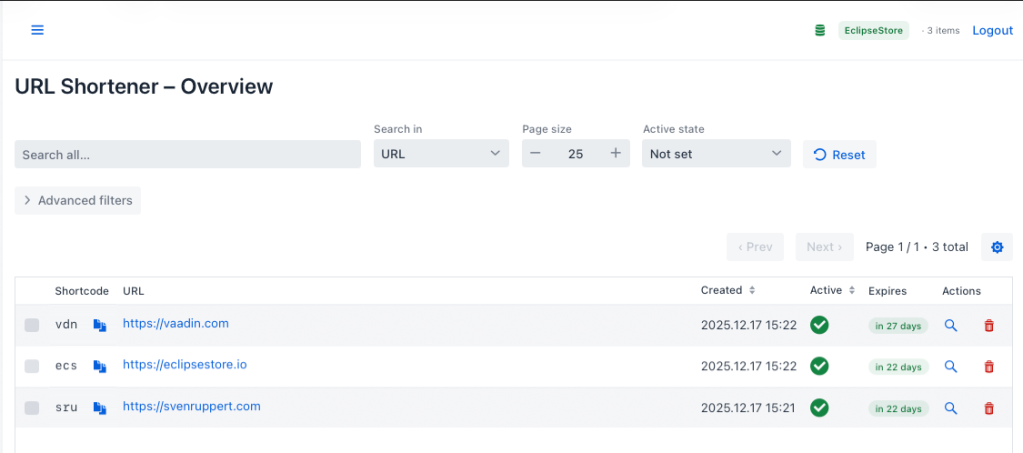
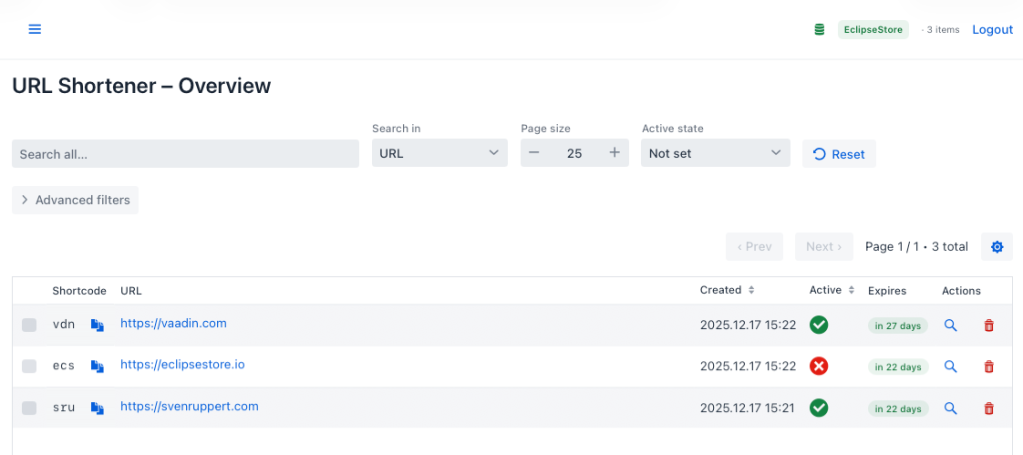
To allow users to change the active or inactive status of a shortlink not only via the API, but also conveniently in the user interface, the grid of the administration view has been extended. The goal is to create the most direct, intuitive, and low-risk way possible to switch the status of a shortlink without opening separate dialogues or editing masks.
At the centre of each table row is a clearly recognisable visual button. With a single click, the user can toggle a shortlink’s status between active and inactive. The interface immediately signals the current state of the shortlink and the action that will be taken when clicked.
This enlargement has three main objectives:
- Speed – frequent switching does not require navigation into additional masks.
- Transparency – the user can see at all times which shortlinks are currently active.
- Robustness – possible error situations are clearly communicated and do not affect the rest of the application.
The core of the implementation lies in configuring the grid and the new “Active” column. The relevant snippet from the OverviewView looks like this:
grid.addComponentColumn(m -> {
      Icon icon = m.active()
          ? VaadinIcon.CHECK_CIRCLE.create()
          : VaadinIcon.CLOSE_CIRCLE.create();

      icon.setColor(m.active()
                        ? "var(--lumo-success-color)"
                        : "var(--lumo-error-color)");
      icon.getStyle().set("cursor", "pointer");
      icon.getElement().setProperty("title",
                                    m.active() ? "Deactivate": "Activate");

      icon.addClickListener(_ -> {
        boolean newValue = !m.active();

        try {
          urlShortenerClient.toggleActive(m.shortCode(), newValue);
          Notification.show("Status updated", 2000, Notification.Position.TOP_CENTER);
          safeRefresh();
        } catch (Exception ex) {
          Notification.show("Error updating active status: " + ex.getMessage(),
                            3000, Notification.Position.TOP_CENTER);
        }
      });
      return icon;
    })
    .setHeader("Active")
    .setKey("active")
    .setAutoWidth(true)
    .setResizable(true)
    .setSortable(true)
    .setFlexGrow(0);
Instead of a plain text field, a component column is used here, displaying a separate icon for each row. The choice of icon depends directly on the current activity status of the respective shortlink:
- If
m.active() istrue , aCHECK_CIRCLEicon is displayed. - If
m.active()isfalse , aCLOSE_CIRCLEicon is used.
The colour scheme (success for active, error for inactive) allows the user to recognise the state at a glance. In addition, the title attribute on the icon tells you which action is triggered by a click (“Activate” or “Deactivate”).
The toggle mechanism is implemented in the icon’s click listener. When clicked, the desired new status is first calculated:
boolean newValue = !m.active();The Java client is then called, which delegates the state change to the server via the REST API:
urlShortenerClient.toggleActive(m.shortCode(), newValue);If the call succeeds, the user receives a short, unobtrusive confirmation notification, and the grid is reloaded via safeRefresh(). This means that subsequent changes (e.g. filtering by active status) are also displayed correctly immediately.
Error handling follows the same pattern as in the client API: If an exception occurs – whether due to network problems, unexpected HTTP status codes or server errors – it is communicated in the UI via a clearly visible notification:
} catch (Exception ex) {
  Notification.show("Error updating active status: " + ex.getMessage(),
                    3000, Notification.Position.TOP_CENTER);
}
For the user, this means that the active status of a shortlink can be changed directly in the overview with a click. The UI combines clear visual cues (icon, colour, tooltip) with immediate feedback and robust error handling. This reduces the need for separate processing dialogues and makes typical administrative tasks around active/inactive much more efficient.
Filter by active and inactive status#
In addition to the ability to switch a shortlink’s active status directly in the grid, the user interface has been enhanced with a precise filter system. This allows the user to search specifically for active, inactive, or all shortlinks – without manual searches or complex queries.
The goal is to provide the user with a tool that allows them to control the visibility of entries flexibly. This improves both the clarity of large datasets and the efficiency of routine administrative tasks, such as detecting expired or disabled shortlinks.
A unified selection element controls the new filter and affects both data retrieval and paging. If the user sets the filter to Active, Inactive, or Not set, the query parameters are updated to load and display only relevant records in the grid.
Central to this is the Select field for the active status, which is defined in the OverviewView:
private final Select<ActiveState> activeState = new Select<>();This UI element is configured in the search bar and displayed alongside other search and paging elements. Initialisation is done in the buildSearchBar() block:
activeState.setLabel("Active state");
activeState.setItems(ActiveState.values());
activeState.setItemLabelGenerator(state -> switch (state) {
  case ACTIVE -> "Active";
  case INACTIVE -> "Inactive";
  case NOT_SET -> "Not set";
});
activeState.setEmptySelectionAllowed(false);
activeState.setValue(ActiveState.NOT_SET);
HorizontalLayout topBar = new HorizontalLayout(globalSearch, searchScope, pageSize, activeState, resetBtn);
This gives the user a clearly labeled drop-down selection with three states:
- Active – only active shortlinks
- Inactive – only inactive shortlinks
- Not set – no filtering by active status
The filter is set to NOT_SET by default , so all shortlinks are displayed first. The ItemLabelGenerator function determines the label displayed in the drop-down for each enum value.
For the filter to be functionally effective, the view reacts to changes in the selection field. A corresponding listener is registered in the addListeners() block:
activeState.addValueChangeListener(_ -> {
  currentPage = 1;
  safeRefresh();
});
As soon as the user changes the active state, the current page is reset to 1 and the data provider is reloaded. This makes the filter changes directly visible and prevents the user from being on an invalid page (for example, if there are fewer entries due to filtering).
The actual connection to the REST API is created in the buildFilter(...)method block that creates a UrlMappingListRequest from the UI :
private UrlMappingListRequest buildFilter(Integer page, Integer size) {
  UrlMappingListRequest.Builder b = UrlMappingListRequest.builder();

  ActiveState activeStateValue = activeState.getValue();
  logger().info("buildFilter - activeState == {}", activeStateValue);
  if (activeStateValue != null && activeStateValue.isSet()) {
    b.active(activeStateValue.toBoolean());
  }
  // ... Other filters (codePart, urlPart, time periods, sorting, paging)

  if (page != null && size != null) {
    b.page(page).size(size);
  }

  var filter = b.build();
  logger().info("buildFilter - {}", filter);
  return filter;
}
Here, the enum value of the activeState select is read and, if it is considered “set,” converted to a Boolean (true for active, false for inactive). The request builder takes over this value and later transmits it to the server by the client (URLShortenerClient) as a query parameter. If the state is NOT_SET, no active value is set, so there is no active-status restriction on the server side.
Together, these building blocks form a consistent filter concept:
- The
Select<ActiveState>provides a clear, three-level selection. - The ValueChangeListener ensures that filter changes take effect immediately.
buildFilter(...)translates the UI selection into a typed request to the backend API.
For users, this creates a seamless interaction: Switching from “Active” to “Inactive” immediately leads to only the corresponding shortlinks appearing in the grid – without this logic having to be duplicated in the frontend or filtered on the client side.
Mass operations based on active status.#
In addition to single editing, the interface offers convenient bulk operations that let users enable or disable multiple shortlinks at once. This is especially helpful in scenarios where large amounts of data need to be managed, such as temporarily shutting down campaign links or reactivating an entire group of previously disabled shortlinks.
In this extension, bulk handling has been designed to integrate seamlessly with the existing grid and the integrated selection mechanisms. The user can select as many rows as they want in the grid and then trigger appropriate actions via clearly recognisable buttons in the bulk bar at the bottom of the screen.
The process always follows the same pattern:
- The user marks the desired short links.
- A confirmation dialogue ensures that the mass change is deliberately triggered.
- The action is performed for each selected entry, regardless of potential errors.
- The result is displayed to the user in a compact success/failure overview.
This approach enables robust yet user-friendly bulk editing. The interface remains responsive, and error handling ensures that a failure on a single shortlink does not affect the entire operation.
The following snippet is taken directly from the OverviewView and shows the central method that enables or disables a set of shortlinks in one pass:
private void bulkSetActive(Set<ShortUrlMapping> selected, boolean activate) {
  int success = 0;
  int failed = 0;

  for (var m : selected) {
    try {
      var ok = urlShortenerClient.toggleActive(m.shortCode(), activate);
      if (ok) {
        success++;
      } else {
        failed++;
      }
    } catch (IOException ex) {
      logger().error("Toggle active state failed for {}", m.shortCode(), ex);
      failed++;
    }
  }

  grid.deselectAll();
  safeRefresh();

  var actionLabel = activate ? "Activate" : "Deactivate";
  Notification.show(
      actionLabel + " – Success: " + success + " • Failed: " + failed
  );
}
This method is central to mass activation. It receives the shortlinks currently selected in the grid, as well as the target status (activate = true or false). For each entry, the corresponding request is sent to the server API via the Java client. The approach is deliberately designed to be fault-tolerant: a failure of one entry does not affect the rest of the processing.
The UI is not updated until the loop is complete. This keeps the operation clear and efficient, even with many shortlinks. The result is displayed to the user in a compact summary.
The user triggers this operation via a confirmation dialogue. This is implemented in confirmBulkSetActiveSelected(boolean activate ):
private void confirmBulkSetActiveSelected(boolean activate) {
  var selected = grid.getSelectedItems();
  if (selected.isEmpty()) {
    Notification.show("No entries selected");
    return;
  }

  var verb = activate ? "activate" : "deactivate";
  var verbCap = activate ? "Activate" : "Deactivate";

  Dialog dialog = new Dialog();
  dialog.setHeaderTitle(verbCap + " all " + selected.size() + " short links?");

  dialog.add(new Text(
      "This will " + verb + " all selected short links. "
          + "They will be " + (activate ? " active" : "inactive") + " afterwards."
  ));

  Button cancel = new Button("Cancel", _ -> dialog.close());
  Button confirm = new Button(verbCap + " All", _ -> {
    dialog.close();
    bulkSetActive(Set.copyOf(selected), activate);
  });
  confirm.addThemeVariants(ButtonVariant.LUMO_PRIMARY);
  dialog.getFooter().add(new HorizontalLayout(cancel, confirm));
  dialog.open();
}
This dialogue ensures that mass changes are not accidentally triggered. This is especially relevant for deactivating actions, as a deactivated shortlink no longer redirects.
The dialogue is activated via the two buttons in the bulk bar:
bulkActivateBtn.addClickListener(_ -> confirmBulkActivateSelected());
bulkDiActivateBtn.addClickListener(_ -> confirmBulkDeactivateSelected());
The associated wrapper methods are:
private void confirmBulkActivateSelected() {
  confirmBulkSetActiveSelected(true);
}

private void confirmBulkDeactivateSelected() {
  confirmBulkSetActiveSelected(false);
}
This means that mass editing is fully integrated into the user interface: selection, confirmation, execution and result feedback follow a clear, consistent process model. For users, an intuitive workflow makes administrative tasks much easier.
Redirect behaviour for end users.#
With the introduction of the new active/inactive mechanism and improved handling of expiration times (expiresAt), the URL shortener’s behaviour when calling a shortlink changes fundamentally. While users previously received only a redirect or a generic error, the system now provides more granular HTTP status codes that enable precise conclusions about a link’s status.
Expired Shortlinks (expiresAt) → 410 Gone#
If a shortlink has an expiration date and has passed, the user must not be redirected to the original URL when accessed. Instead, the system must clearly signal that this shortlink exists, but is no longer valid. This is precisely what the HTTP status code 410 Gone is used for.
The status code 410 indicates “permanently removed” and makes it unmistakably clear that the shortlink was previously active but is now deliberately unavailable. Unlike 404 Not Found, which means that a resource does not exist, 410 conveys a clear semantic meaning: this shortlink has expired and will never be valid again.
For the user, this means the call results in clear error behaviour that remains comprehensible. For developers, on the other hand, this mechanism creates transparency, as they can clearly distinguish between three situations:
- A shortlink does not exist → 404 Not Found
- A shortlink exists, but is disabled → 404 Not Found
- A shortlink exists and has expired → 410 Gone
The consistent use of the 410 status code also enables better monitoring and cleaner automation processes. Systems such as API gateways, SEO tools, crawlers, or CI/CD pipelines can capture the exact behaviour and thus more precisely explain why a redirect does not occur.
Disabled (active = false) → 404 Not Found#
Another central component of the new active/inactive model is how deactivated shortlinks are handled. While expired links are signalled with the HTTP status code 410 Gone , the system deliberately uses a different status code for disabled links: 404 Not Found.
This difference is not accidental, but follows clear safety and operational considerations. A deactivated shortlink should behave as if it no longer exists for the end user, although it remains fully present, visible, and manageable internally.
This creates a behaviour ideal for maintenance phases, temporary blockades, campaign stops, or safety-related shutdowns. Developers and administrators retain complete control over the dataset without inadvertently revealing internal state information.
Cheers Sven