
Server-Side Extension: PreferencesHandler and REST Interfaces#
The server-side extension for dynamic column visibility follows the same design logic as the UI: simplicity, clear accountability, and a precise data flow. While the OverviewView and the ColumnVisibilityDialog form the interface for the interaction, several specialized REST handlers handle the processing and persistence of the user settings. Their job is to process incoming JSON requests, validate them, translate them into domain operations, and return or store the current state.
The source code for this version can be found on GitHub athttps://github.com/svenruppert/url-shortener/tree/feature/advent-2025-day-04
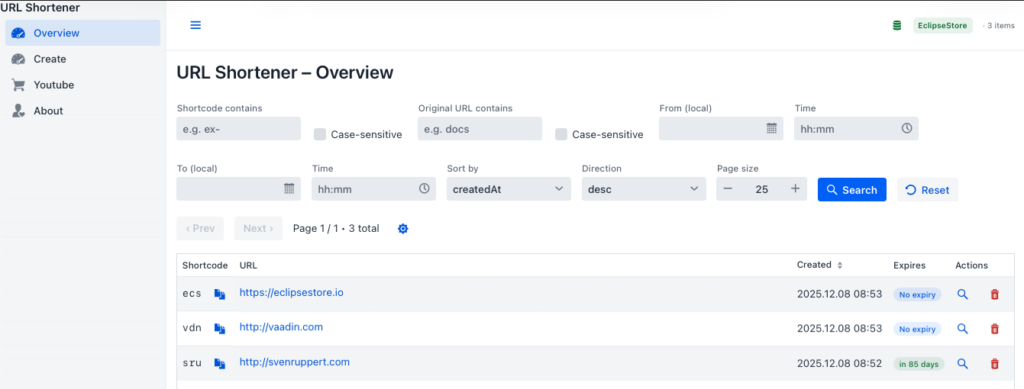
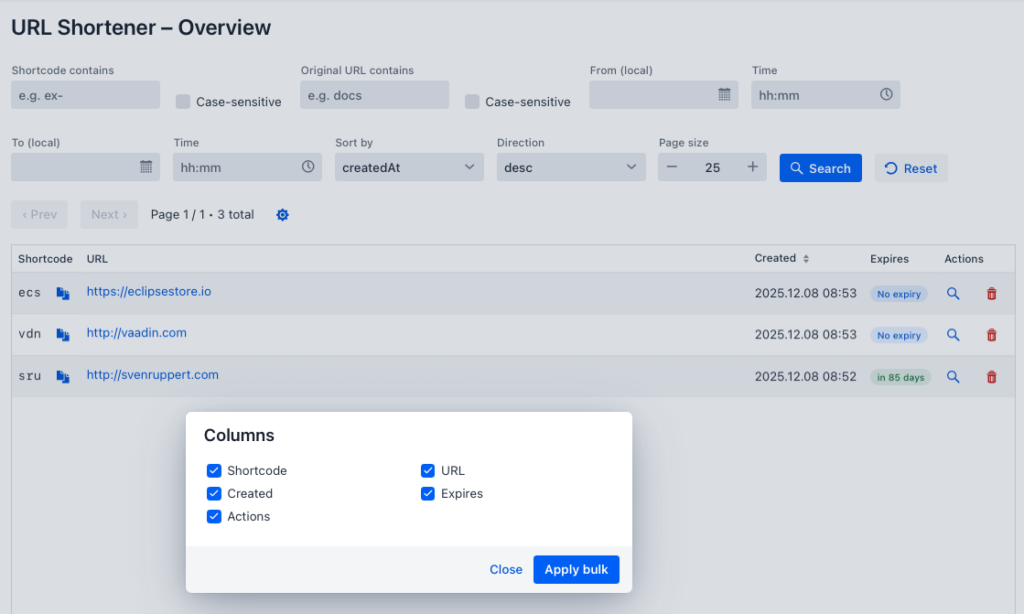
Here’s the screenshot of the version we’re implementing now.
The central link is the PreferencesStore interface, which defines both read and write operations for column preferences. It is divided into two functional aspects – loading and updating:
public interface PreferencesStore extends PreferencesLookup, PreferencesUpdater, HasLogger {
}

public interface PreferencesLookup {
  Map<String, Boolean> load(String userId, String viewId);
}

public interface PreferencesUpdater {
  void saveColumnVisibilities(String userId, String viewId, Map<String, Boolean> visibility);
  void delete(String userId, String viewId, String columnKey);
  void delete(String userId, String viewId);
  void delete(String userId);
}
This structure forms the foundation for the subsequent merchant classes. Each REST endpoint includes a clearly defined operation—loading, editing, or deleting column preferences. This creates a granular API that is idempotent on the one hand and enables precise error handling on the other.
The first port of call is the ColumnVisibilityHandler, which accepts POST and DELETE requests. It is responsible for loading all of a user’s column settings within a view. The handler first checks that the request is complete, and then returns a flat JSON map that maps column names and visibility states:
@Override
public void handle(HttpExchange ex) throws IOException {
  switch(ex.getRequestMethod()) {
    case "POST" -> handleLoad(ex);
    case "DELETE" -> handleDeleteAll(ex);
    case "OPTIONS" -> allow(ex, "POST, DELETE, OPTIONS");
    default -> methodNotAllowed(ex, "POST, DELETE, OPTIONS");
  }
}

private void handleLoad(HttpExchange ex) throws IOException {
  var req = fromJson(readBody(ex.getRequestBody()), ColumnInfoRequest.class);
  var vis = store.load(req.userId(), req.viewId());
  writeJson(ex, OK, toJson(vis == null ? Map.of() : vis));
}
In addition, there are two specialized variants that separate the editing operations from each other. The ColumnVisibilitySingleHandler handles PUT and DELETE requests for individual columns. It takes a JSON object with user ID, view ID, and column name and updates the persistence accordingly:
private void handleSingleEdit(HttpExchange ex) throws IOException {
  var req = fromJson(readBody(ex.getRequestBody()), ColumnSingleEditRequest.class);
  var visibility = Map.of(req.columnKey(), req.visible());
  store.saveColumnVisibilities(req.userId(), req.viewId(), visibility);
  writeJson(ex, OK, toJson(Map.of("status", "ok")));
}
For bulk uploads, the ColumnVisibilityBulkHandler is used. This variant allows you to update multiple column states in a single request at the same time. The concept of bulk processing reduces latency and minimizes server-side write operations, for example, if the user changes many checkboxes in the dialog:
private void handleBulkEdit(HttpExchange ex) throws IOException {
  var req = fromJson(readBody(ex.getRequestBody()), ColumnEditRequest.class);
  store.saveColumnVisibilities(req.userId(), req.viewId(), req.changes());
  writeJson(ex, OK, toJson(Map.of("status", "ok")));
}
All three handlers follow the same design pattern: they validate the request, call the appropriate methods of the PreferencesStore and send back the correct HTTP status code. If successful, the server will respond with 200 OK or 204 No Content, and if the input is incorrect, it will respond with 400 Bad Request. This convention makes the interface robust and easy to test.
The new API thus forms the backbone of the personalization logic. At the same time, it is an example of the loose coupling between UI and persistence: the client knows nothing about the storage strategy, the server nothing about the representation. Both communicate via well-defined JSON structures. This principle keeps the application extensible and independent of concrete implementation details – be it an in-memory store or long-term storage in EclipseStore.
The PreferencesClient: Round trip between UI and server#
The connection between the user interface and persistence is established by the PreferencesClient. This component takes on the task of addressing the REST endpoints of the server side via HTTP, serializing data and converting the results into structures that can be used within the Vaadin UI. The client thus acts as an intermediary between the interaction logic of the interface and the data storage of the server – a classic link between display and state.
The structure of the PreferencesClient follows the established pattern of the project’s other service clients. It uses the Java standard library with HttpClient, HttpRequest and HttpResponse and completely dispenses with external dependencies. Communication takes place via clearly defined endpoints, all of which are documented in the class:
/**
 * Client for server-side column visibility preferences.
 *
 * Endpoints:
 * - POST /admin/preferences/columns -> load
 * - DELETE /admin/preferences/columns -> delete all (for a view)
 * - PUT /admin/preferences/columns/edit -> bulk edit
 * - PUT /admin/preferences/columns/single -> single edit
 */
public final class ColumnVisibilityClient implements HasLogger {
The client provides a set of methods that directly correspond to the server-side REST endpoints. The typical flow of a round trip starts with loading the stored visibility information:
public Map<String, Boolean> load(String userId, String viewId)
    throws IOException, InterruptedException {
  var reqDto = new ColumnInfoRequest(userId, viewId);
  var req = requestBuilder(PATH_ADMIN_PREFERENCES_COLUMNS)
      . POST(jsonBody(reqDto))
      .build();

  var resp = http.send(req, HttpResponse.BodyHandlers.ofString(UTF_8));
  if (resp.statusCode() == 200) {
    var body = resp.body();
    if (body == null || body.isBlank()) return Collections.emptyMap();
    var parsed = parseJson(body);
    return parsed.entrySet().stream()
        .collect(Collectors.toMap(Map.Entry::getKey,
            e -> Boolean.parseBoolean(e.getValue())));
  }
  if (resp.statusCode() == 204) return Collections.emptyMap();
  throw new IOException("Unexpected HTTP " + resp.statusCode() + " while loading column visibilities: " + resp.body());
}
The method generates a simple JSON object from the user and view IDs and sends it to the server as a POST request. The answer contains a map of column names to truth values that can be used directly in the UI. Missing values are interpreted as true , which is in line with the principle of full visibility.
The client offers two variants for changes: the editing of individual columns and the bulk update. While the editSingle method specifically adjusts a column state, editBulk allows you to commit multiple changes in a single request. This separation corresponds to the semantic structure of the REST handlers:
public void editSingle(String userId, String viewId, String columnKey, boolean visible)
    throws IOException, InterruptedException {
  var reqDto = new ColumnSingleEditRequest(userId, viewId, columnKey, visible);
  var req = requestBuilder(PATH_ADMIN_PREFERENCES_COLUMNS_SINGLE)
      . PUT(jsonBody(reqDto))
      .build();

  var resp = http.send(req, HttpResponse.BodyHandlers.ofString(UTF_8));
  if (resp.statusCode() != 200) {
    throw new IOException("Unexpected HTTP " + resp.statusCode() + " on single edit: " + resp.body());
  }
}
This method illustrates the principle of idempotency: multiple calls with the same data result in the same state without producing side effects. This is especially important for reactive user interfaces that update states asynchronously.
In combination with the ColumnVisibilityService, which acts as a wrapper, this creates a clear communication flow:
- The UI interacts with the service via the ColumnVisibilityDialog.
- The service calls the appropriate endpoints via the PreferencesClient.
- The server side validates, stores and returns current states.
- The service reflects the new values in the grid.
The entire system is therefore deterministic, comprehensible and fault-tolerant. If a transfer fails, the previous state is retained and the user can initiate the operation again. The PreferencesClient thus forms the technical basis for the stable persistence of visual preferences – a simple but extremely robust bridge between interaction and storage.
Persistence and EclipseStore integration#
The storage of user preferences for column visibility is done in the same persistence system that was already introduced in the previous parts of the project: EclipseStore. This decision not only follows the consistency of the architecture design, but also underlines the goal of bringing together all system states – whether functional or visual – in a coherent data model. The persistence of user preferences thus becomes an equal part of the application.
The implementation of the PreferencesStore interface plays a central role in this. There are several concrete variants in the architecture: an in-memory version for tests and volatile scenarios as well as an EclipseStore-supported version for productive operation. Both follow the same contract model, but differ in the underlying storage medium.
The following excerpt shows the interface structure on which the implementations are based:
com.svenruppert.urlshortener.api.store.preferences.PreferencesStore
public interface PreferencesStore extends PreferencesLookup, PreferencesUpdater, HasLogger {
}

com.svenruppert.urlshortener.api.store.preferences.PreferencesLookup
public interface PreferencesLookup {
  Map<String, Boolean> load(String userId, String viewId);
}

com.svenruppert.urlshortener.api.store.preferences.PreferencesUpdater
public interface PreferencesUpdater {
  void saveColumnVisibilities(String userId, String viewId, Map<String, Boolean> visibility);
  void delete(String userId, String viewId, String columnKey);
  void delete(String userId, String viewId);
  void delete(String userId);
}
These clear contracts form the basis for various storage strategies. In particular, the EclipseStore variant (EclipsePreferencesStore) integrates seamlessly into the existing object graph. When saving, it checks whether an entry for the combination of user and view ID already exists and updates the visibility information accordingly. A new entry is only created if no previous state exists. This logic ensures idempotency and prevents unnecessary duplicates.
The following fragment from the EclipseStore implementation illustrates the principle:
com.svenruppert.urlshortener.api.store.provider.eclipsestore.patitions.EclipsePreferencesStore (simplified excerpt)
@Override
public void saveColumnVisibilities(String userId, String viewId, Map<String, Boolean> visibility) {
  var userPrefs = dataRoot.preferences().computeIfAbsent(userId, _ -> new HashMap<>());
  var viewPrefs = userPrefs.computeIfAbsent(viewId, _ -> new HashMap<>());
  viewPrefs.putAll(visibility);
  storage.storeRoot(dataRoot);
}
This method illustrates the simplicity and directness of persistence: All preferences are stored in the root object, so they automatically become part of the transactional storage in the EclipseStore. The entire system benefits from object persistence without classic database tables or ORM layers.
A key feature of this solution is its resilience. Because EclipseStore automatically synchronizes changes, user preferences are reliably maintained even if the system terminates unexpectedly. In addition, the application benefits from the direct object addressing that EclipseStore offers: no complicated ORM mappings are necessary, and changes to the data structure are automatically applied. Storage thus remains as natural as the modeling itself.
In addition, the persistence layer remains extensible. By separating the interface and implementation, alternative storage mechanisms can also be used in the future – such as an encrypted file variant for particularly sensitive environments or a network-based solution for multi-user systems. The existing code of the UI and the server handler would not have to be adapted for this, as all access takes place via the PreferencesStore interface.
With this integration, the persistence path is complete: from the user to the dialog, the service, the client, the REST interfaces and finally to the EclipseStore, the data flow is consistently typed and consistent. This finally makes column visibility a part of the permanent system state – a visible sign that user interaction and data storage are no longer separate worlds in this architecture, but two perspectives on the same, persistent context.
Architecture and Event Flow#
The introduction of dynamic column visibility has not only spawned new UI and server components, but has also refined the entirety of the application architecture. It has created a consistent flow of events that aligns all levels, from the user interface down to persistence. This consistency makes the function not only robust, but also expandable and testable.
At the center of this flow is the OverviewView as the trigger for user interaction. When the user presses the gear icon, the ColumnVisibilityDialog opens, which in turn communicates via the ColumnVisibilityService. This service calls the ColumnVisibilityClient, which in turn calls the server’s REST endpoints. The server processes the request via the appropriate handlers – such as ColumnVisibilityHandler, ColumnVisibilitySingleHandler or ColumnVisibilityBulkHandler – and writes the changes to the EclipseStore via the PreferencesStore. Finally, the return channel ensures that the stored visibility is automatically restored during the next initialization.
The sequence can be schematically represented as follows:
Users → OverviewView → ColumnVisibilityDialog → ColumnVisibilityService
         → ColumnVisibilityClient → REST API → PreferencesHandler
         → PreferencesStore → EclipseStore → Persistent Storage
Each of these components fulfils a clearly defined role and communicates exclusively via well-defined interfaces. In this way, the architecture strictly follows the principle of separation of concerns. The UI part remains completely decoupled from persistence, while the server logic does not require any knowledge of the frontend. Changes to one layer do not have an immediate effect on the other layers.
A particularly elegant aspect can be seen in the interaction between the user interface and the event system. The OverviewView is connected to the StoreEvents event system . As soon as changes to the database are detected on the server side, a signal is sent to the UI via a publish/subscribe pattern. The application responds to this with a synchronized refresh:
subscription = StoreEvents.subscribe(_ -> getUI().ifPresent(ui -> ui.access(this::refresh)));This mechanic, which is already known from the previous days of the Advent calendar, ensures that the user interface and saved state always match. It forms the foundation of reactivity throughout the project.
The event flow within the application is thus bidirectional: On the one hand, the user initiates interactions that lead through the round trip to persistence. On the other hand, persistent changes can in turn have an effect on the UI. This interplay between action and reaction creates a dynamic coherence that makes the system tangibly alive.
Compared to classic web applications, in which the state between client and server is often fragmented or only temporary, this architecture establishes a continuous data cycle. Every step is traceable and typified – from the checkbox in the dialog to the saved Boolean map in the EclipseStore. This minimizes sources of error and significantly increases the maintainability of the application.
All in all, it can be seen that the addition of dynamic column visibility is not just a new function, but a maturation of the entire system architecture. It combines UI, event control and persistence into a coherent whole and thus lays the foundation for further personalization mechanisms based on the same principles.
UX and ergonomics: Self-determined work#
With the introduction of dynamic column visibility, the relationship between user and application is fundamentally changing. While the previous functions were primarily aimed at consistency, stability and clarity, one aspect is now coming to the fore that was previously mainly implicit: the self-determination of the user. The OverviewView interface is no longer a rigid reflection of developers’ decisions, but becomes a customizable tool that is subordinate to the individual ways of working of its users.
This change is already evident in the way the dialogue has been shaped. The ColumnVisibilityDialog follows the principle of minimal friction: the user should be able to adjust his view without losing context or feeling cognitive load. Therefore, the dialog opens modally, focuses on the current task and offers only those controls that are relevant for the decision. Each checkbox represents a column – nothing more, nothing less. The immediate feedback in the grid after each change ensures that the user experiences the effects of their decision directly.
The combination of immediate feedback and persistent storage has a psychologically important effect: it creates trust. When a system visibly responds to the user’s preferences and restores them unchanged the next time it is opened, the feeling of stability and control is created. This is one of the cornerstones of good interaction design – the system should not only work, but also appear reliable.
The placement of the function on the surface also follows ergonomic considerations. The gear icon that opens the dialog is deliberately designed to be unobtrusive. It is accessible at all times, but not dominant. This keeps the focus on the content while keeping control over the presentation always within reach. The user decides for himself when and to what extent he makes adjustments. The system does not impose itself, but reacts.
Combined with the automatic restoration of preferences at launch, it creates a gentle personalization that feels organic. The application not only remembers states – it also remembers habits. If you have hidden certain columns, you signal a personal usage pattern that will be quietly respected on your next visit. This form of implicit personalization is efficient because it does not require additional dialogues, profile settings or user accounts and still creates an individual experience.
The developer perspective is not left out. The architecture was designed in such a way that the expansion of further personal settings – such as sort orders, column widths or layout preferences – would be possible seamlessly. The existing concept of the PreferencesStore allows the inclusion of additional parameters without structural changes. This creates an extensible system that may seem simple in the user experience, but is highly modular in the background.
This makes the dynamic column visibility feature more than just a convenience feature. It is an expression of a philosophy: the user should be able to find himself in the application. Software that adapts instead of demanding adaptation creates acceptance and productivity at the same time. The user remains the focus, technology takes a back seat – exactly where it has its greatest effect.
Technical reflection and safety aspects#
The introduction of dynamic column visibility is not only a functional extension, but also a technical statement. It shows that personalization in a modern web application does not have to be at odds with robustness, security, and maintainability. Rather, individualization can be integrated as a controlled and comprehensible extension of the existing security model.
From a technical point of view, the new function touches on several security-relevant levels. First of all, the handling of user IDs should be mentioned. In the current implementation, the username “admin” serves as a placeholder, but in a production environment, this information comes from an authenticated context. It is important that the preferences are strictly tied to the authenticated user in order to ensure a clear delimitation of the visibility areas. A user may only access their own stored preferences – never anyone else’s.
The interfaces themselves are designed in such a way that they already implicitly assume this separation. Each request contains both a userId and a viewId. The REST handlers check that both values are present and valid. Missing or empty fields will result in a controlled rejection of the request:
if (isBlank(req.userId()) || isBlank(req.viewId())) {
  writeJson(ex, BAD_REQUEST, "userId and viewId required");
  return;
}
This simple but effective validation protects against non-specific calls and prevents unwanted manipulation of the database. In combination with the REST semantics, which only allow idempotent operations (POST, PUT, DELETE), it ensures that the application behaves deterministically even under heavy load or during repeated requests.
Another important aspect concerns data integrity within the PreferencesStore. Since the stored values are organized in a map<string, Boolean> the question arises as to how to deal with invalid or manipulated data. The implementation uses type checking and defensive programming for this purpose: Only known column names are adopted, unknown or incorrect keys are discarded. This keeps the persisted state consistent, even if a failed client sends data.
var knownKeys = grid.getColumns()
    .stream()
    .map(Grid.Column::getKey)
    .filter(Objects::nonNull)
    .toList();

Map<String, Boolean> state = service.mergeWithDefaults(knownKeys);
This logic in the UI prevents unauthorized or inappropriate values from being stored in the first place. The dialog works exclusively with those columns that actually exist in the grid, and is therefore inherently resistant to manipulation attempts on the client side.
In addition to functional safety, resilience to errors also plays an essential role. All communication paths between client and server are embedded in try-catch blocks. If the connection is lost or the server does not respond, the application will continue to be usable. The service reports errors via logging without blocking user interaction:
try {
  client.editBulk(userId, viewId, changes);
} catch (IOException | InterruptedException e) {
  logger().warn("Persist bulk failed {}: {}", changes.keySet(), e.toString());
}
This approach ensures that server communication failures do not have a negative impact on the user experience. The user can continue working; its changes are automatically synchronized on the next successful connection.
Overall, it can be seen that the security concept of the application has not been weakened by the expansion, but strengthened. The integrity of the system is maintained through clear interfaces, typed data structures, defensive programming and strict separation of user contexts. The dynamic column visibility proves that user freedom and system security are not mutually exclusive, but – if implemented carefully – reinforce each other.
Result#
With the introduction of dynamic column visibility, the development of the administration interface has reached a decisive milestone. What began as a static, system-centric overview in the first days of the Advent calendar has now developed into an interactive, user-centered platform. The application learns, reacts and remembers – it becomes a tool that adapts to the user instead of forcing him to get used to its structures.
Instead of replacing existing components, they have been expanded and precisely linked to each other. The new ColumnVisibilityDialog fits seamlessly into the existing UI concept, the PreferencesClient uses the same mechanisms as the previous REST clients, and persistence via the EclipseStore closes the circle of dataflows. Everything interlocks, without breaks or special paths. This homogeneity is not a coincidence, but the result of an architecture that has anchored openness and coherence as fundamental principles from the very beginning.
From a user experience perspective, the extension is a step towards self-determination. Users can now personalize their workspace without having to struggle through menus and options. The interface remains light, the behavior is comprehensible and the stored preferences create trust in the stability of the application. The system reacts to user decisions instead of forcing them – a paradigm shift that noticeably increases the quality of interaction.
The clear separation between user context, visibility logic and data storage prevents manipulation and ensures data integrity. The use of typed maps and well-defined REST endpoints minimizes sources of error. Persistence via EclipseStore also offers the advantage that the application remains consistent at all times, even in the event of abrupt interruptions or partial failures.
Looking ahead opens up new possibilities. On the basis of the now established preference system, further personalization dimensions can be implemented: column sequences, sorting preferences, color schemes or layout options. By loosely coupling UI, service and persistence, the system is ready for these extensions without having to change existing structures. Integration with user profiles or role-based access models could also be built on it.
Cheers Sven