
From observer to designer: User control at a glance#
With the fourth day of the Advent calendar, the perspective on the application changes fundamentally. While in the previous expansion stages users reacted primarily to prepared structures, an element of active design is now being added. The “Overview” has so far been a central mirror of the system state: It showed all saved short links, allowed them to be filtered and provided an in-depth insight into individual objects with the detailed dialog. But the structure and visibility of the columns were immutable up to this point. The user always saw the selection that the developer had defined as meaningful. With the introduction of dynamic column visibility, this state is removed.
- From observer to designer: User control at a glance
- Concept: Visibility as a user preference
- The new UI interaction: ColumnVisibilityDialog
- Integration with the OverviewView
The source code for this version can be found on GitHub athttps://github.com/svenruppert/url-shortener/tree/feature/advent-2025-day-04
Here’s the screenshot of the version we’re implementing now.
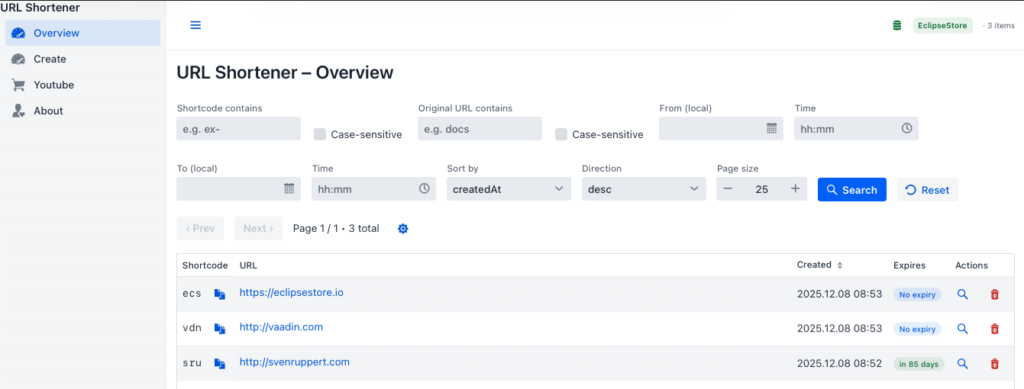
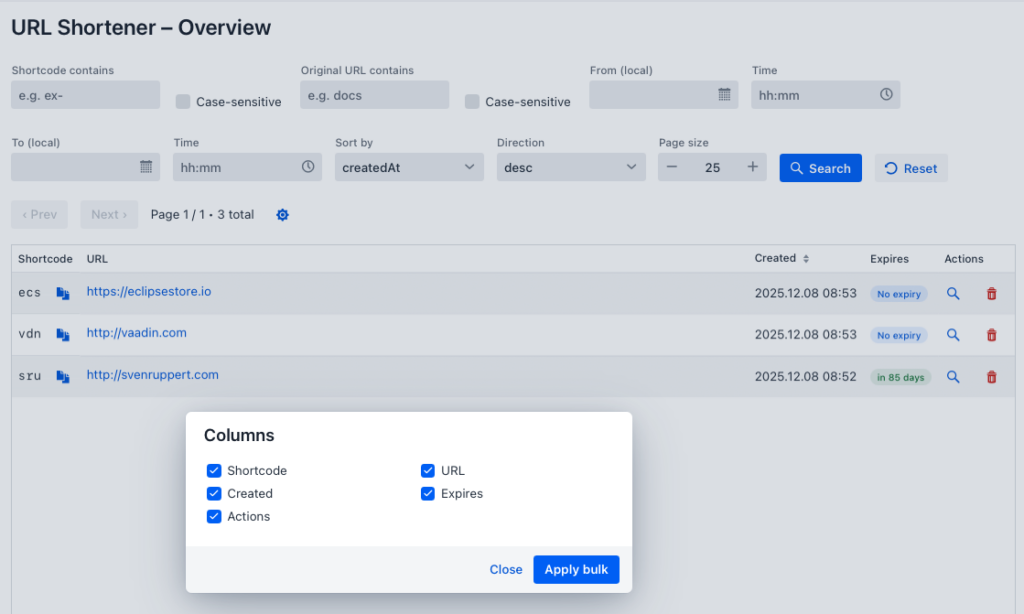
The grid in the OverviewView is thus transformed from a static display element into a customizable tool. Users can choose which columns are visible and which are hidden. This step seems minor at first glance, but it leads to a new form of interaction between user and application. The system no longer determines the surface structure, but reacts to individual preferences. The application enters into a dialogue with the user, in which the view of data becomes part of the personalization.
This extension is a direct continuation of the basis laid in the previous days. The filter and search mechanisms from the first part have taken control of the data flow. The integration of EclipseStore has made the state visible and at the same time established permanent storage in the system. Finally, the detail dialog created the separation between the overview and the object context. With this in mind, the new feature is the next logical step: it shifts control over the presentation of data from the system to the user without complicating the underlying technical structure.
From a user experience perspective, this change is significant. Those who work with the administration interface on a daily basis develop their own rhythm in dealing with data. Some users focus on expiring links, others on manual aliases, or on the traffic of their short links. For all these scenarios, a static column arrangement is a hindrance. The ability to hide irrelevant information and tailor the view to your own work processes creates not only convenience, but also efficiency. The user thus turns from a passive observer into an active designer of his or her work environment.
The implementation of this principle in Vaadin is based on a conscious balance between simplicity and persistence. On the one hand, the function should be immediately available: One click opens a dialog, a handful of checkboxes controls the visibility of the columns, and the result becomes immediately visible. On the other hand, these attitudes should not remain fleeting. The selected configuration is permanently saved and automatically restored on each reboot. This persistence in visual behavior takes up the idea of the visible system state and transfers it to the user level.
The introduction of dynamic column visibility thus marks the beginning of a new chapter in the development of the administration interface: It is no longer just about the presentation of data, but about the design of one’s own work context. This feature marks a paradigm shift in the UI design of the project. Instead of predefined structures, a flexible, learning interface is created that adapts to individual ways of working and thus takes a decisive step towards true user-centricity.
Concept: Visibility as a user preference#
The introduction of dynamic column visibility not only marks an ergonomic improvement in the user interface, but also a conceptual expansion of the application architecture. For the first time, an aspect of user interaction is permanently personalized – regardless of the session or system state. This innovation requires a separate model for preferences that works consistently on both the client and server side. Visibility thus becomes a stored property that is mediated between the user and the application.
The central idea is that each view in the application has its own identity. For the OverviewView, this means that its configuration – such as which columns are visible – is clearly stored under a view ID. At the same time, each user instance is identified, for example by means of a user ID, and treated as a carrier of individual preferences. These two dimensions – user and view – are key to storing visibility information. The concept thus follows a clear scheme: a user ID, a view ID and an assignment of column names to truth values.
The introduction of this logic required a new interface between the UI and the backend. The application had to learn to deal with semantic information about user decisions, not just data objects. On the server side, this is done by the new PreferencesHandler, which serves as a REST endpoint and allows both loading and saving the settings. On the client side, the new PreferencesClient component communicates with this handler and manages the transfer of the data structures. The connecting format is deliberately simple: a map<string, Boolean> in which each key corresponds to the column name and the value describes the visibility. This clarity makes it possible to keep the mechanism generic and later to extend it to other areas of the application.
The decision to model preferences as a separate entity is an important architectural step. It separates application data—such as short links and expiration information—from the presentation data that drives the user’s behavior within the interface. In this way, the persistence layer is expanded by a new category: no longer only technical but also contextual states. This pattern is reminiscent of the separation between domain logic and UI logic, which is central to the clean architecture approach, and consistently transfers it to the behavior of the user interface.
Another goal of the implementation is transparency. The preferences should not act as a black box, but remain traceable at all times. Changes to the column configuration are therefore immediately visible and saved at the same time. The user does not feel a break between the interaction and the result, and yet their behavior is preserved permanently. This dual nature – volatile response and persistent storage – makes the system a learning tool. The application remembers how its users work and automatically reproduces this behavior on the next call.
This adds a semantic layer to the UI concept: visibility is no longer understood as a technical property of the grid component, but as an expression of an individual way of working. The application itself becomes a customizable medium that adapts to people, not the other way around. In this perspective, the dynamics of column visibility become a symbol for the transition from standardized operation to personalized control – a principle that will also be reflected in the technical implementation in the following chapters.
The new UI interaction: ColumnVisibilityDialog#
With the introduction of dynamic column visibility, the application’s user interface gets a new level of interaction. The previously immutable structure of the OverviewView is extended by a component that allows the user to directly influence the structure of his working environment. At the heart of this is the ColumnVisibilityDialog – a dialog box that lists all available columns in the overview table and controls their visibility via simple checkboxes. It embodies the idea of a configurable but intuitive interface.
The concept of dialogue follows a deliberate reduction: no cluttered settings menu, no hidden options, but a clear, focused place for a single task. When the dialog is opened, the application reads the saved preferences of the current user via the PreferencesClient and sets the checkboxes according to the stored values. Each checkbox represents a column of the OverviewView – such as “Shortcode”, “URL”, “Created” or “Expires”. Changes are immediately visible: As soon as the user selects or deselect a checkbox, the corresponding column in the grid is shown or hidden. This creates a direct interplay between action and reaction, which strengthens the perception of control.
The ColumnVisibilityDialog is deliberately implemented as an independent component. It extends the Vaadin class Dialog and follows the same architectural philosophy as the already known DetailsDialog from the previous days. This parallel allows it to fit seamlessly into the existing structure: it has a clear lifecycle logic, its own events and a minimalist layout that is designed for comprehensibility and efficiency. The dialog typically contains a vertical list of checkboxes that is dynamically generated from the grid’s column configuration. A save button permanently updates preferences through the PreferencesClient, while a “Reset” button restores the original default view.
From a technical point of view, the dialog is based on a simple but elegant data flow. When opened, the client loads a map<string, Boolean> whose keys correspond to the column identifiers. This map is converted into UI elements, with the current visibility mirrored directly in the grid. Clicking on “Save” triggers the method saveColumnVisibilities(userId, viewId, visibilityMap), which transmits the changed settings to the server. The JSON format is deliberately left flat to be both human-readable and easily testable. Server-side storage in EclipseStore ensures that these changes are not only retained for the current session, but also permanently.
The interplay of dialog, grid and client shows the strength of the modular approach. The ColumnVisibilityDialog does not know any details about persistence or grid implementation – it works exclusively via clearly defined interfaces. This keeps the component independent, reusable, and easily expandable. This pattern is particularly important in the Vaadin architecture because it ensures the loose coupling between user interaction and system health.
From a user experience perspective, the dialog performs two tasks at the same time. It provides control without complexity and creates confidence in the stability of the system. Users experience that their individual decisions are not only temporary, but are structurally anchored in the application. Every adjustment is reproducible, every change is reversible. This creates a natural balance between freedom and security, which reflects the character of the entire project. The ColumnVisibilityDialog thus becomes a visible expression of the idea that an administration interface should not only provide tools, but also adapt to the way its users work.
To illustrate this, the following is an original excerpt from the dialog, which shows the coupling between checkboxes and grid columns as well as the collection of changes for an optional collective persistence. The code works directly on the column keys of the grid and reflects state changes back to the interface without any detours.
Map<String, Boolean> pending = new LinkedHashMap<>();

grid.getColumns().forEach(col -> {
  final String key = col.getKey();
  if (key == null) return; only addressable columns

  boolean visible = state.getOrDefault(key, true);
  col.setVisible(visible);

  var cb = new Checkbox(col.getHeaderText() != null ? col.getHeaderText() : key, visible);
  cb.addValueChangeListener(ev -> {
    boolean v = Boolean.TRUE.equals(ev.getValue());
    col.setVisible(v);
    pending.put(key, v);
  });

  form.add(cb);
});

var btnApply = new Button("Apply bulk", _ -> {
  if (!pending.isEmpty()) {
    service.setBulk(new LinkedHashMap<>(pending));
    pending.clear();
  }
  close();
});
btnApply.addThemeVariants(ButtonVariant.LUMO_PRIMARY);
The dialog deliberately delegates the actual persistence to the service. This node abstracts the transport and writes the changed visibilities to the server in one go. The following fragment shows the corresponding method in the service, which encapsulates the round trip and at the same time remains fault-tolerant.
public void setBulk(Map<String, Boolean> changes) {
  if (changes == null || changes.isEmpty()) return;
  try {
    client.editBulk(userId, viewId, changes);
  } catch (IOException | InterruptedException e) {
    logger().warn("Persist bulk failed {}: {}", changes.keySet(), e.toString());
  }
}
In this way, the ColumnVisibilityDialog remains lean and focused on the interaction, while the persistence logic is handled centrally via the service and the underlying client. This division of responsibilities ensures that the user experience feels clear and responsive without compromising the technical integrity of the application.
Integration with the OverviewView#
The introduction of the ColumnVisibilityDialog would have remained incomplete if it had not been organically embedded in the existing OverviewView. This is exactly where the strength of the architecture becomes apparent, which was designed for loose coupling and clear responsibilities from the very beginning. The OverviewView serves as the application’s central window—connecting data, filters, paging, and interaction. Now it is expanding this spectrum to include a persistent personalization dimension.
At the center of the integration is an inconspicuous but meaningful button in the search bar: the gear icon. This icon acts as an entry point into the configuration logic. The decision not to hide the dialog in a menu or in a separate view follows the idea of control available at all times. Users should be able to customize the presentation of the data exactly where they look at it. The code snippet from the OverviewView illustrates this direct integration:
btnSettings.addThemeVariants(ButtonVariant.LUMO_TERTIARY);
btnSettings.getElement().setProperty("title", "Column visibility");
btnSettings.addClickListener(_ -> new ColumnVisibilityDialog<>(grid, columnVisibilityService).open());
With just a few lines, the entire functionality is connected. The button opens a new instance of the dialog, which receives the current grid and the corresponding service instance. This service instance manages all operations on the stored preferences. In this way, a clear data flow is created: the OverviewView calls the dialog, the dialog interacts with the ColumnVisibilityService, and the ColumnVisibilityService in turn communicates with the server via the ColumnVisibilityClient.
The initialization of the service takes place when the view is attached to the UI. This phase is ideal for loading user contexts and creating initial states. The relevant code block from the onAttach method shows this flow:
@Override
protected void onAttach(AttachEvent attachEvent) {
  super.onAttach(attachEvent);
  this.columnVisibilityService = new ColumnVisibilityService(columnVisibilityClient, "admin", "overview");

  var keys = grid.getColumns().stream()
      .map(Grid.Column::getKey)
      .filter(Objects::nonNull)
      .toList();

  var vis = columnVisibilityService.mergeWithDefaults(keys);
  grid.getColumns().forEach(c -> {
    var k = c.getKey();
    if (k != null) c.setVisible(vis.getOrDefault(k, true));
  });

  refresh();
  subscription = StoreEvents.subscribe(_ -> getUI().ifPresent(ui -> ui.access(this::refresh)));
}
When setting up the view, the service is first created and linked to the user and view ID. All known column names are then determined and their visibility is coordinated with the stored preferences. Each column will then be shown or hidden according to its saved setting. This way, the column states are not fleeting, but consistent between sessions and restarts.
This integration is deliberately implemented discreetly. The dialog is invoked only when the user becomes active, and the service automatically takes into account the saved settings. In this way, the application is not overloaded with new interactions, but its behavior is organically expanded by a context-aware memory.
One aspect of this architecture is the way it maintains the balance between control and simplicity. The user does not need to load or save any configuration – everything happens in the background. The view remains responsive, the server records the state, and the dialog acts as an interface between the two. This invisible connection between the surface and the persistence layer gives the application the lightness that keeps it intuitive and efficient despite the growing variety of functions.
Cheers Sven