
What has happened so far?#
In the first part of “Basic Login Solution”, the foundation for a deliberately simple yet structurally clean admin login was laid. The starting point was the realisation that even a technically lean URL shortener requires a clear separation between public-facing functions and administrative operations. The goal was not complete user management, but rather a minimal access barrier that integrates seamlessly with the existing Java and Vaadin architectures.
The central component of this solution is a lean, file-based configuration in auth.properties. With just two parameters – an activation switch and a password – the login can be fully controlled. The associated LoginConfigInitializer ensures that this configuration is read when the servlet container starts and remains consistently available to the application. This clearly defines whether and how the protection mechanism takes effect even before any UI is rendered.
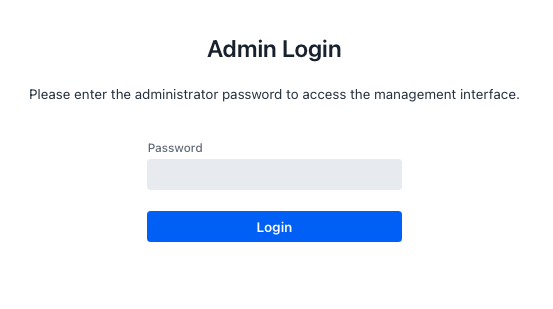
Based on this, an independent login view was introduced that does not require MainLayout. It serves as a clear entry point into the administrative area and separates the login context from the rest of the UI, both visually and technically. The implementation focuses on a simplified user experience: a password field, a clear call to action, and clear feedback on success or failure. At the same time, an important architectural principle of today is already evident here: security logic and UI interaction remain neatly separated.
After completing Part 1, a functional login is available, but no full access control is yet in place. Without additional measures, unauthenticated users could continue to access administrative views directly, for example, via deep links or saved URLs. This is precisely where the second part comes in.
In Part 2, login is effectively enforced for the first time: via central route protection in MainLayout, consistent session management with SessionAuth, and a clean logout mechanism. This transforms an isolated login screen into a complete, end-to-end authentication flow that reliably protects the application’s administrative area.
The source code for this article can be found on GitHub at the following URL:https://github.com/svenruppert/url-shortener/tree/feature/advent-2025-day-09
Route Protection & Access Logic#
With the introduction of admin login, it is not enough to provide only a login page. The decisive factor in the protection’s effectiveness is that all administrative views are consistently protected and accessible only to authenticated users. This is precisely where Route Protection comes in: in conjunction with LoginConfig and SessionAuth, it ensures the application clearly distinguishes between logged-in and non-logged-in users.
Instead of securing each view individually, the implementation uses a single central location: the MainLayout. Since all relevant management views use this layout, it is a natural anchor point for bundling the access logic. As soon as a view with this layout is loaded, the MainLayout can check whether login is enabled and whether the current user is already authenticated. Only when these conditions are met is access to the target view granted.
There are several benefits to implementing route protection within the layout. On the one hand, the code in individual views remains lean because they do not have to perform security checks themselves. On the other hand, a uniform logic is implemented that applies equally to all protected areas. If the mechanism is later expanded or adapted, a change at a central location can affect behaviour across the entire application.
From a functional perspective, route protection follows a simple process: when a navigation enters a view that uses MainLayout, it checks whether login is globally enabled before rendering. If this is not the case, the application behaves as before and still allows direct access to all pages. If login is enabled, the logic checks whether the current session is marked as authenticated. If not, the user will be automatically redirected to the login page.
An exception is the login view itself. It must always be accessible without prior authentication, as it enables access to the protected area. If they were also subject to route protection, an infinite redirect loop would result. The implementation explicitly handles this special case by excluding the login route from the check.
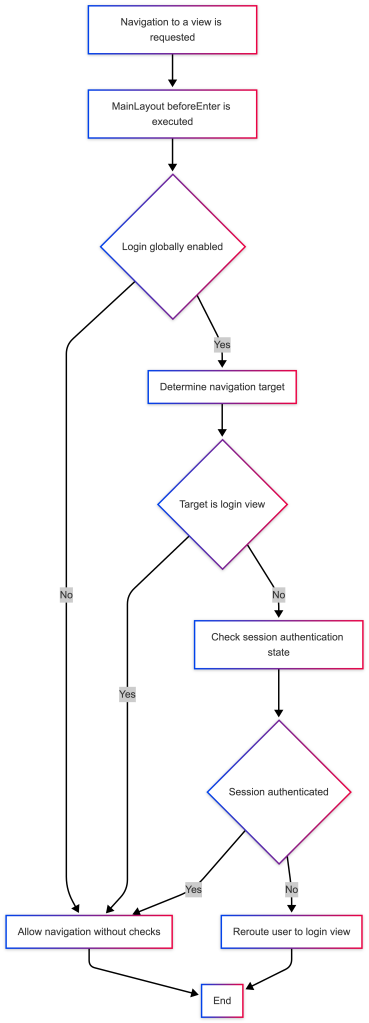
In practice, this mechanism results in transparent, predictable behaviour: non-logged-in users who open a deep link directly into the admin UI are automatically redirected to the login page. After a successful login, you will be taken to the desired administration page and can navigate the protected area without further interruptions. At the same time, the option to altogether turn off the login at the configuration level is retained – in this case, the application behaves as if route protection never existed.
Implementation in MainLayout#
The technical implementation of route protection is anchored in the MainLayout. This not only serves as a visual framework for the administration interface but also assumes a central control function for all navigation leading to the protected area via the BeforeEnterObserver interface.
First, the layout is extended so that it can participate in navigation and, at the same time, receive logging functionality:
    extends AppLayout
    implements BeforeEnterObserver, HasLogger {
The implementation of BeforeEnterObserver enables the MainLayout to perform a check before each navigation to a View that uses it. At the same time, HasLogger provides a convenient logging API to make decisions and states in the log traceable.
The actual route protection is bundled in thebeforeEnter method:
  @Override
  public void beforeEnter(BeforeEnterEvent event) {

    If login is globally turned off, do not protect any routes.
    if (! LoginConfig.isLoginEnabled()) {
      return;
    }

    logger().info("beforeEnter target={} authenticated={}",
                  event.getNavigationTarget().getSimpleName(),
                  SessionAuth.isAuthenticated());

    The login view itself must never be protected, otherwise we create a loop
    if (event.getNavigationTarget().equals(LoginView.class)) {
      return;
    }

    if (! SessionAuth.isAuthenticated()) {
      logger().info("beforeEnter.. isAuthenticated()==false - reroute to LoginView");
      event.rerouteTo(LoginView.class);
    }
  }
The logic follows the process described above exactly. First, it is checked whether the login is active per the configuration. If login.enabled is set to false in the auth.properties file, the method returns immediately without any restrictions. In this mode, the application behaves as it did before Route Protection was introduced.
If login is enabled, the next step is to check the current navigation destination and verify whether the user is already authenticated—a short log entry records which view to navigate to and the current authentication status. If the target is the LoginView, the check is aborted – the login page always remains accessible, regardless of whether the session is already logged in or not.
For all other views, if the session is not marked as logged in by SessionAuth.isAuthenticated(), the user will be transparently redirected to the login page. The original target view is not rendered, so no administrative functions are visible without authentication.
Logout button in the header#
Closely linked to route protection is the ability to clean end an existing session. This functionality is also implemented in the MainLayout and appears to the user as a logout button in the header. The creation of this button is linked to the configuration:
    HorizontalLayout headerRow;
    if (LoginConfig.isLoginEnabled()) {
      var logoutButton = new Button("Logout", _ -> {
        SessionAuth.clearAuthentication();
        UI.getCurrent().getPage().setLocation("/" + LoginView.PATH);
      });
      logoutButton.addThemeVariants(ButtonVariant.LUMO_TERTIARY_INLINE);
      headerRow = new HorizontalLayout(toggle, appTitle, new Span(), storeIndicator, logoutButton);
    } else {
      headerRow = new HorizontalLayout(toggle, appTitle, new Span(), storeIndicator);
    }
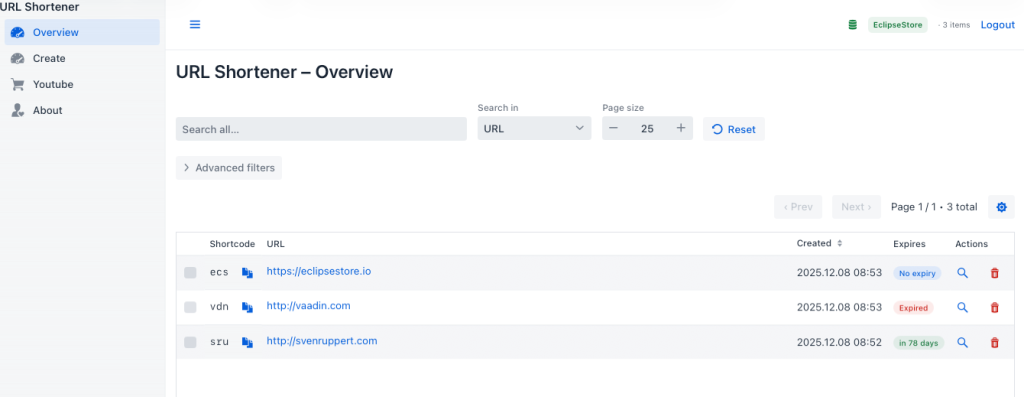
If the login is deactivated, no logout button is displayed because there is no state to terminate. If the login is active, MainLayout adds a simple inline logout button to the header. Clicking it calls SessionAuth.clearAuthentication(), removes the authentication attribute from the VaadinSession, and closes the session. The browser is then explicitly redirected to the login page via setLocation.
The combination of the beforeEnter check and the logout button creates consistent access logic: Users are directed to the login page when they first access the protected area, can move freely within the admin UI after successful login, and can end their session at any time in a visible, controlled manner.
In the next chapter, we will focus on the SessionAuth class, which encapsulates the login status in the session and provides a centralised access point.
Logout function in the header#
A login mechanism is only complete if it also knows a clear way back. In practice, this means that anyone who logs in to the admin interface must be able to end their session just as consciously. The introduction of a logout function is therefore not only a technical addition but also an essential signal to users that access to the administrative area is considered a sensitive context.
In the URL shortener, this functionality is shown as a slim logout button in the header. It is visible only if login protection is enabled in the configuration and the application is in “protected mode”; in all cases where “login.enabled=false", the UI does not display this button because there is no session to log off. This deliberately keeps the interface tidy in simple development or demo scenarios.
From the user’s perspective, the logout button is inconspicuously integrated into the existing header. It does not appear as a prominent CTA, but it is always available in the admin area. The naming is deliberately kept clear: “Logout” leaves no room for interpretation and signals that the current authorisation context is ended here. In environments where multiple people work one after the other using the same browser and admin interface, this clarity is essential.
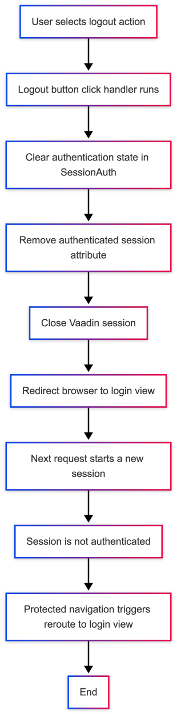
Technically, clicking the logout button performs two tasks: first, the authentication status in the current VaadinSession is reset; second, the browser is redirected to the login page. This ensures that the administrative views do not remain open in the browser; subsequent access still follows the login flow. Even an accidentally open tab loses its authorisation as soon as the user logs out.
The implementation adheres closely to the rest of the login architecture. The button does not check itself whether a session is authenticated; instead, it delegates this to the small helper class SessionAuth, which is also used elsewhere, such as for route protection. This keeps the logout consistent: the same abstraction that determines whether a session is considered logged in is also responsible for deleting this status.
From a UX perspective, the logout function also helps structure users’ mental model. As long as they are logged in, they are in an active administration context where changes to shortlinks and configurations are expected. When they log out, they deliberately revert to a neutral role, in which they use the generated URLs at most from the user’s perspective. This separation is particularly helpful in heterogeneous teams where not all participants need administrative rights simultaneously.
Implementation in MainLayout#
The logout function is centrally integrated into the MainLayout. The header is built there, and the logout button can be added alongside the app title and the store indicator. Whether this button is visible depends directly on the login configuration:
HorizontalLayout headerRow;
if (LoginConfig.isLoginEnabled()) {
  var logoutButton = new Button("Logout", _ -> {
    SessionAuth.clearAuthentication();
    UI.getCurrent().getPage().setLocation("/" + LoginView.PATH);
  });
  logoutButton.addThemeVariants(ButtonVariant.LUMO_TERTIARY_INLINE);
  headerRow = new HorizontalLayout(toggle, appTitle, new Span(), storeIndicator, logoutButton);
} else {
  headerRow = new HorizontalLayout(toggle, appTitle, new Span(), storeIndicator);
}
In activated mode, a “Logout” button is created and added to the header’s HorizontalLayout. The look is based on the rest of the UI and uses the LUMO_TERTIARY_INLINE variant, so the button appears discreet and blends visually with the header.
The actual logoff logic is in the click listener: First, SessionAuth.clearAuthentication() is called to reset the current session’s authentication state. The browser is then explicitly redirected to the login view path. This means that the user is not just taken to a “blank” page after logging out, but is clearly recognisable back to the entry point of the admin area.
If the login function is globally deactivated, the button is omitted. The headerRow layout then consists only of toggle, title, spacer and StoreIndicator. This deliberately keeps the UI slim in scenarios without login protection and does not display a non-working logout button.
SessionAuth – Session state management#
The SessionAuth helper class includes all accesses to the authentication state within the VaadinSession. It is used by both the route protection and the logout button and thus represents the central abstraction layer for login decisions:
package com.svenruppert.urlshortener.ui.vaadin.security;

import com.svenruppert.dependencies.core.logger.HasLogger;
import com.vaadin.flow.server.VaadinSession;

import static com.svenruppert.dependencies.core.logger.HasLogger.staticLogger;
import static java.lang.Boolean.TRUE;

public final class SessionAuth
    implements HasLogger {

  private static final String ATTR_AUTH = "authenticated";

  private SessionAuth() {
  }

  public static boolean isAuthenticated() {
    VaadinSession session = VaadinSession.getCurrent();
    if (session == null) return false;
    var attribute = session.getAttribute(ATTR_AUTH);
    staticLogger().info("isAuthenticated.. {}", attribute);
    return TRUE.equals(attribute);
  }

  public static void markAuthenticated() {
    staticLogger().info("markAuthenticated.. ");
    VaadinSession session = VaadinSession.getCurrent();
    if (session != null) {
      session.setAttribute(ATTR_AUTH, TRUE);
    }
  }

  public static void clearAuthentication() {
    staticLogger().info("clearAuthentication.. ");
    VaadinSession session = VaadinSession.getCurrent();
    if (session != null) {
      session.setAttribute(ATTR_AUTH, null);
      session.close();
    }
  }
}
The markAuthenticated() method is called after a successful login and sets the simple attribute authenticatedtoTRUE in the current VaadinSession. With isAuthenticated(), this state can be queried again later – for example, in the route protection of the MainLayout. Both methods use logging to quickly determine when a session was logged in or logged out, in the event of an error, or when analysing user behaviour.
For the logout, clearAuthentication() is crucial. It removes the attribute from the session and also closes the VaadinSession. This will also discard other session-related data, and an accidentally opened browser tab will lose its permissions. The next time it is accessed, a new, unauthenticated session is established and guided through the login flow.
This tight integration of MainLayout and SessionAuth creates a robust, yet manageable, logout implementation. The header provides a clearly visible exit from the admin context, and the session logic ensures this exit is implemented consistently from a technical standpoint.
In the next chapter, we will take a closer look at the SessionAuth class and examine its role in interacting with route protection and the login view within the overall application flow.
SessionAuth: Session-based authentication in the overall flow#
Now that login protection, the login page, and the logout function have been introduced, a central question remains: Where is it actually recorded whether a user is authenticated? The answer lies in the small but crucial helper class SessionAuth, which anchors the authentication state in VaadinSession.
At its core, SessionAuth fulfils three tasks. It can first check whether a current session is already registered. Second, after successful login, it can mark the session as authenticated. And thirdly, it can remove the authentication status when logging out and close the session. These three operations form the basis of the login view, route protection in the MainLayout, and the logout button in the header, all of which access a standard truth value rather than maintaining their own state.
The chosen approach leverages the fact that Vaadin maintains a separate VaadinSession for each user. This session exists on the server side and is therefore less susceptible to client-side manipulation than, for example, a simple browser flag. By setting a dedicated attribute – such as “authenticated” – in this session, SessionAuth clearly links the login state to the current browser session. If the same user opens a new browser window, a new session is created; the user is not logged in again.
In the interaction between components, this results in a precise flow: if a user reaches the login page and enters a correct password, LoginView calls SessionAuth.markAuthenticated() after a successful check. It then navigates to the administrative overview. As soon as the user opens additional views from there, the MainLayout checks whether the session is still considered logged in, as part of the route protection, using SessionAuth.isAuthenticated(). If this is the case, navigation is allowed. Otherwise, the request will be redirected to the login page.
Finally, if the user clicks the logout button in the header, SessionAuth.clearAuthentication() removes the authentication attribute from the session and closes VaadinSession. For the server, this session is over. The following request establishes a new session, which is again considered unauthenticated from the application’s perspective, so Route Protection redirects the request back to the login view.
This session approach fits well with the project’s objective: it is deliberately kept simple, requires no additional infrastructure and is easy to understand. At the same time, it meets the requirements of a minimalist admin login, which is less about highly secured, distributed authentication procedures and more about a clear separation between “logged in” and “not logged in” within a running browser session.
In the rest of this chapter, we will go through the implementation of the three methods isAuthenticated, markAuthenticated and clearAuthentication and look at how they interact at the different points in the code – Login-View, MainLayout and Logout-Button.
The implementation of SessionAuth in detail#
The SessionAuth class is deliberately kept compact. It encapsulates access to the VaadinSession and provides three static methods, each of which fulfils a clearly defined task:
package com.svenruppert.urlshortener.ui.vaadin.security;

import com.svenruppert.dependencies.core.logger.HasLogger;
import com.vaadin.flow.server.VaadinSession;

import static com.svenruppert.dependencies.core.logger.HasLogger.staticLogger;
import static java.lang.Boolean.TRUE;

public final class SessionAuth
    implements HasLogger {

  private static final String ATTR_AUTH = "authenticated";

  private SessionAuth() {
  }

  public static boolean isAuthenticated() {
    VaadinSession session = VaadinSession.getCurrent();
    if (session == null) return false;
    var attribute = session.getAttribute(ATTR_AUTH);
    staticLogger().info("isAuthenticated.. {}", attribute);
    return TRUE.equals(attribute);
  }

  public static void markAuthenticated() {
    staticLogger().info("markAuthenticated.. ");
    VaadinSession session = VaadinSession.getCurrent();
    if (session != null) {
      session.setAttribute(ATTR_AUTH, TRUE);
    }
  }

  public static void clearAuthentication() {
    staticLogger().info("clearAuthentication.. ");
    VaadinSession session = VaadinSession.getCurrent();
    if (session != null) {
      session.setAttribute(ATTR_AUTH, null);
      session.close();
    }
  }
}
isAuthenticated() – Check if a session is logged in#
The isAuthenticated() method is the primary read-only interface. It is used, among other things, in the MainLayout to decide whether navigation should be allowed or redirected to the login view as part of route protection. Internally, she first asks about the current VaadinSession. If no session exists (for example, in the very early stages of a request), it returns false immediately.
If a session exists, the “authenticated” attribute is read. It is a simple object value set to “Boolean.TRUE” upon successful login. The method compares this value to TRUE and returns true or false accordingly. The additional log entry helps track how often and with what results this check is invoked in the running system.
markAuthenticated() – Mark session as logged in#
After a successful password check in the LoginView, markAuthenticated() is called. The method fetches the current VaadinSession and sets the “authenticated" attribute to TRUE. This updates the session state so that subsequent calls to isAuthenticated() return true for that session.
Here, too, a log entry ensures that the registration time remains traceable. If unexpected conditions occur in the company – for example, because users report that they are “suddenly logged out again” – the logs can be used to understand better when sessions were marked or discarded.
clearAuthentication() – log out and close session#
The third method, clearAuthentication(), is the counterpart to login. The logout button in the MainLayout invokes it and performs two tasks simultaneously. First, it removes the "authenticated" attribute from the current session by setting it to null. This means isAuthenticated() will return false for this session from this point on.
In the second step, “session.close()" is called. This invalidates the entire VaadinSession, including any other attributes that may have been set. This measure ensures that other session-related information is not forwarded and that a new request actually starts with a fresh session.
In combination with the explicit navigation back to the login page, this results in a clean logout flow: the session loses its authorisation, the user leaves the admin context, and must authenticate again to continue.
Interaction with Login View and MainLayout#
In the overall flow of the application, SessionAuth is used in several places:
- In the
LoginView, theattemptLogin()method callsSessionAuth.markAuthenticated()after a successful password comparisonand then navigates to the overview page. - In
the MainLayout, the beforeEnter() implementation uses SessionAuth.isAuthenticated() to intercept unauthorised access and, if necessary, redirect to the login view. - The logout button in the header calls
SessionAuth.clearAuthentication()and then redirects the user out of the administration context to the login page.
In this way, SessionAuth centralises all access to the authentication status in a single place. Changes to the session model – such as a different attribute name or additional metadata – are made here and are then consistently available to all consuming components.
Conclusion & Outlook#
With the introduction of a simple, configurable admin login, the application gains a clearly defined protection mechanism for all administrative functions without the complexity of a full-fledged authentication framework. The solution is deliberately tailored to the project’s characteristics: lightweight, comprehensible, and implemented using pure Java/Vaadin architecture. At the same time, it covers the most essential requirements for minimal access control – from password requests to route protection to a clean logout mechanism.
The overall system consists of a few clearly separated building blocks: a central configuration file, the LoginConfig for evaluating these values, a simple login view for user interaction, route protection in the MainLayout, and the SessionAuth class for managing session state. These components interlock like gears, creating a process that remains technically sound and intuitive for users.
At the same time, the implementation is deliberately extensible. The current approach stores the password in plain text in the configuration file and uses it, unchanged, as a byte sequence within the application. This is sufficient for development and internal scenarios, but it is clear that it is not suitable for higher security requirements. However, the architecture leaves room for the following points of expansion:
- Password hashing: The stored passwords are hashed using a hash function such as SHA-256 or bcrypt, so they are not stored in plaintext on the server.
- Multiple users or roles: The structure could be expanded to support various administrators with individual passwords.
- Time-limited sessions: An automatic logout due to inactivity would further enhance security.
- Two-Factor Authentication (2FA): For more demanding environments, a second level of security – for example via TOTP – could be added.
- External identity providers: The application could be connected to OAuth 2.0/OpenID Connect in the long term, provided it fits the application scenario.
However, the strength of the solution lies precisely in its not attempting to anticipate these aspects. It provides a pragmatic, ready-to-use foundation that reliably protects the admin area from unintended access without unnecessarily complicating deployment or development.
Cheers Sven