

Export functions are often seen as a purely technical side task: one button, one download, done. In a Vaadin-based application, however, it quickly becomes apparent that exporting is much more than writing data to a file. It is a direct extension of the UI state, an infrastructural contract between frontend and backend, and a decisive factor for maintainability and predictability.
- Export from a UI point of view: more than a download button
- Initial situation: functional export, but non-UI
- Design Goal: Export as a Deterministic UI Workflow
- Uniform responses as a prerequisite for clean UI logic
- Filter logic as a common language between the grid and export
- Download mechanics in Vaadin: Button ≠ Download
- StreamResource: Export on demand instead of in advance
- Paging boundaries as a protective mechanism
- Effects on maintainability and comprehensibility
- Conclusion
This article shows how a JSON-based export was deliberately designed as a UI-driven workflow in the URL shortener project. The focus is not on file formats or complex backend abstractions, but on the clean embedding of the export in a Vaadin Flow interface: filter coupling, download mechanics, paging boundaries and clear responsibilities between UI, client and server.
**The current source code can be found on GitHub underhttps://github.com/svenruppert/url-shortener orhttps://3g3.eu/url
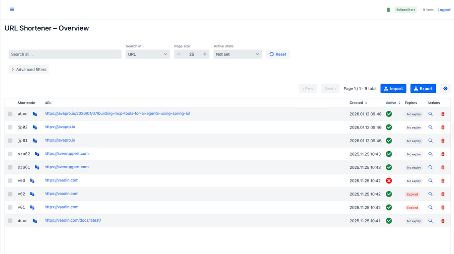
Export from a UI point of view: more than a download button#
In classic web applications, export is often thought of as an isolated API endpoint. From the perspective of a Vaadin UI, this consideration falls short. For the user, export is not a technical process but a consequence of the current UI state: the filters applied, the sorting, and the paging limits.
An export that ignores this coupling immediately leads to cognitive breaks. The display in the grid shows a certain amount of data, but the export provides something else – be it more, less or simply different data. This is exactly where it is determined whether an application is perceived as consistent.
The claim in the project was therefore clear: The export is not a special function, but a mirror of the UI state.
This decision shapes all further design steps – from the filter generation to the download mechanics to the structure of the export data itself.
Initial situation: functional export, but non-UI#
Before the revision, an export was already technically possible. Data could be read on the server and returned to the client as JSON, ensuring the basic functionality was fulfilled. However, from a user interface perspective, this implementation introduced several structural issues that only became apparent upon closer inspection.
The response structures were inconsistent and required the client to interpret them in context. The meaning and interaction of HTTP status codes and response bodies were not explicitly defined; they were derived from implicit assumptions in the client code. At the same time, there was no clear connection between the export and the currently visible filters in the interface. From the UI’s perspective, it was only possible to trace the data that was actually exported indirectly. In addition, there was special logic for empty results or error cases that could not be derived consistently from the response itself but were distributed across several places in the client.
From Vaadin’s perspective, the export was not an integrated UI workflow but rather an isolated technical endpoint. The UI had to provide knowledge of special cases, status codes, and response formats that were not explicitly covered by a contractually defined framework. This state of affairs was also reflected in the test landscape: tests were often based on concrete string representations or complete JSON output rather than on clearly defined functional structures. Changes to filters, sorting or response formats therefore had to be followed up in several places and carried an increased risk of unintended side effects.
In short, the export worked technically but did not meet the requirements for a UI-enabled, traceable, and maintainable component in a Vaadin application.
Design Goal: Export as a Deterministic UI Workflow#
The central goal of the redesign was not “more features”, but predictability. For the Vaadin UI, this means:
The export uses the same filters as the grid and thus reflects the current UI state. Paging limits are deliberately set and comprehensible for developers and users alike, so that the scope and character of the export remain clearly recognisable. Success, empty results and error cases are clearly distinguishable and can be handled in the UI without special logic. At the same time, the download behaves browser-compliantly and UI-stably without affecting the current UI state.
From the UI’s perspective, an export must not have its own state. He must not “think” anything, expand anything, or change anything implicitly. It is a snapshot of what the user sees – nothing more, nothing less.
Uniform responses as a prerequisite for clean UI logic#
In a Vaadin application, API responses have an immediate effect on the UI code, as each response is typically translated directly into UI states, component logic, and user feedback. In contrast to purely client-side frontends, the UI logic is tightly coupled to server-side processing: Each response directly updates component state, enables or disables controls, and renders feedback to the user.
In this context, inconsistent response formats inevitably lead to complex if-else cascades in the UI code. Special treatments for seemingly trivial cases, such as “empty” exports or different error states, must be explicitly requested. The UI code starts by interpreting technical details of the API – such as certain HTTP status codes or the presence of individual JSON fields – instead of relying on clearly defined business signals. This not only increases the code complexity but also complicates the interface behaviour during extensions, making it harder to understand and more error-prone.
In the URL shortener project, this problem was solved by introducing an explicit and stable response structure. Regardless of whether an export record is empty or contains an error, the response always follows the same structure. HTTP status codes are still used to signal the rough outcome of a request, but they do not serve as the sole signifier. The actual technical information – such as the context, scope, and content of the export – is transmitted in full and consistently in JSON format.
A simplified, real export from the system illustrates this approach:
{
  "formatVersion": "1",
  "mode": "filtered",
  "exportedAt": "2026-02-05T11:28:54.582886239Z",
  "total": 9,
  "items": [ /* subject records */ ]
}
This creates a clear and stable contract for the Vaadin UI. The UI code can rely on the fact that metadata such as mode, exportedAt, or total is always present and interpreted consistently. The interface no longer has to guess whether an export was successful or whether there are special cases. Instead, the process can be designed in a linear, deterministic way: metadata is evaluated, the scope is checked, and the user data is processed or reported back to the user.
This structure has far-reaching consequences for UI logic. Loading indicators, confirmation dialogs or error messages can be derived directly from the structured response, without additional special logic or context-dependent checks. This keeps the interface clear, predictable, and closely linked to the technical significance of the answer, rather than tied to technical special cases or implicit assumptions.
Filter logic as a common language between the grid and export#
A crucial Vaadin-specific point is the reuse of the filter logic. There is no separate export filter in the project. Instead, the export is generated exclusively from the current UI state.
The SearchBar acts as the only source of truth:
public UrlMappingListRequest buildFilter(int page, int size) {
  UrlMappingListRequest req = new UrlMappingListRequest();
  req.setPage(page);
  req.setSize(size);
  req.setActiveState(activeState);
  req.setCodePart(codeField.getValue());
  req.setUrlPart(urlField.getValue());
  req.setFrom(from);
  req.setTo(to);
  req.setSort(sort);
  req.setDir(dir);
  return req;
}
This Request object is used for both grid display and export. This guarantees:
Display and export thus produce identical results, since both are based on the same filter definitions. Changes to filters or collations automatically and consistently affect display and export without requiring additional code. At the same time, there are no hidden or implicit export parameters, so the export behaviour can be fully explained by the UI state.
From a maintenance perspective, this is a significant advantage: if you understand the UI, you understand the export.
Download mechanics in Vaadin: Button ≠ Download#
A common mistake in Vaadin applications is trying to start a file download directly from a button click. Technically, this is problematic: a button click primarily triggers server-side logic, whereas a download is a resource from the browser’s perspective.
In Vaadin, a button click is primarily a server-side UI event. The browser does not send a “classic” download request; instead, Vaadin processes the click via its UI/RPC communication (server round-trip, event listener, component update). From the browser’s perspective, this is not a normal navigation or resource retrieval. And that’s exactly why “button clicks → browser downloads file” is not reliable, because the browser typically only starts a download cleanly when it retrieves a resource (link/navigation) or submits a form – i.e. something that is perceived in the browser as a “real request for a file”.
The anchor (<a>) element solves this problem because it is a standard download target for the browser: it has an href attribute that points to a resource, and the download attribute signals to the browser: “This is a file”. In Vaadin, you bind this href to a StreamResource. This creates a separate HTTP request when clicking the anchor, which is not part of the Vaadin UI event flow but rather an independent resource retrieval. Only at this moment is the StreamResource “pulled”, and the export content is generated on demand.
In practice, this has three major advantages:
- Browser compliance and reliability: The download is started via a mechanism that the browser natively supports. This reduces edge cases in which a download triggered by a UI event is blocked or behaves inconsistently (e.g., pop-up/download policies, timing, UI updates).
- Decoupling from the UI lifecycle: The download occurs in a separate request. Even if Vaadin processes UI requests in parallel, if the user clicks on or rerenders the interface, the download can continue to run stably. This is especially important if export generation takes longer or is streamed.
- Clean accountability: The button is purely UI/UX (icon, tooltip, permissions, enable/disable, visual feedback). The anchor is purely “transport” (browser download). The StreamResource is purely a “data supplier” (the export is generated only when needed). This separation makes the code more maintainable and reduces the side effects.
Button btnExport = new Button(VaadinIcon.DOWNLOAD.create());
btnExport.setTooltipText("Export current result set as ZIP");
btnExport.addClickListener(e ->
    exportAnchor.getElement().callJsFunction("click")
);
The actual download behaviour is in the anchor connected to a StreamResource:
StreamResource exportResource =
    new StreamResource("export.zip", () -> {
      UrlMappingListRequest filter =
          searchBar.buildFilter(1, chunkSize);
      return urlShortenerClient.exportAllAsZipDownload(filter);
    });
exportAnchor.setHref(exportResource);
exportAnchor.getElement().setAttribute("download", true);
This pattern clearly separates the responsibilities: the UI interaction is limited to the button, which serves exclusively as a trigger for export. The browser download is triggered via the anchor element and is therefore treated as a regular resource request. Finally, the data is made available via the StreamResource, which only generates the export content when it is actually downloaded.
The export is only generated when the browser actually retrieves the resource – not when the user clicks on it.
StreamResource: Export on demand instead of in advance#
The use of StreamResource is not a detail, but a deliberate architectural decision. The export is generated on demand while the browser reads the stream.
This has several advantages. On the UI side, the memory footprint remains low because the export does not need to be fully pre-generated and buffered. At the same time, the UI thread is not blocked because the data transfer occurs outside the regular UI lifecycle. The download can continue regardless of the current UI state, even if the user navigates or performs further actions during this time. If errors occur during stream generation, they can be propagated cleanly via a separate HTTP request without causing the UI state to become inconsistent.
The export is thus technically decoupled from the UI lifecycle, although it is logically triggered by the UI.
Paging boundaries as a protective mechanism#
Another explicitly UI-related aspect of the export implementation is the deliberate limit on export quantity. The export uses the same chunkSize as the grid in the interface and is additionally limited by a fixed upper limit. This decision ensures that the export always remains within a clearly defined framework and can be derived directly from the current UI state.
From an architectural perspective, this limitation prevents the export from processing large amounts of data in an uncontrolled manner when a user triggers an export. Especially in Vaadin applications, where UI interactions are typically synchronous with server-side logic, this protective measure is crucial. It reduces the risk of heavy memory loads, long runtimes, or blocking operations that could negatively impact other users or the entire server.
At the same time, the paging boundary conveys a clear technical semantics to the outside world. The export is deliberately defined as an image of the currently visible result set. It mirrors exactly what the user sees in the grid, including filtering, sorting, and paging configurations. This does not imply a claim to completeness, as is typically associated with a backup.
This clarity is particularly relevant for user expectations. The export does not provide a complete system print or a historically complete data set, but a specifically selected excerpt. The limitation makes this character explicit and prevents misinterpretations, such as assuming that an export can fully restore the system.
From a maintenance and operations perspective, the paging boundary also serves as a natural safety line. It forces us to consciously design export scenarios and, if necessary, to provide separate mechanisms for backups or mass data withdrawals. As a result, the export remains a controllable UI tool and does not insidiously become an infrastructural backdoor for unlimited data queries.
In summary, limiting export volume is not a technical constraint but a deliberate design decision. It combines UI state, user expectations and system stability into a consistent overall picture and underlines once again that the export in the URL shortener is understood as a UI-driven result set – and expressly not as a substitute for a backup.
Real JSON export from the running system#
The architectural decisions described above are particularly well understood from a real export of the running system. The following JSON export was generated directly from the Vaadin interface and represents a specific UI state at a defined point in time.
Even at the top level, the export contains all the necessary contextual information to enable independent classification. The formatVersion field explicitly defines the export format version, providing a stable foundation for future extensions. Changes to the internal data model do not automatically propagate to the export contract, provided the version limit is respected.
The field mode is deliberately chosen to speak. The filtered value makes it unmistakably clear that this is not a complete data deduction, but a result set restricted by UI filters. This information is crucial because it prevents the export from being mistakenly interpreted as a backup. The export does not capture the entire system state; it only includes the section the user has seen in the grid.
With exportedAt, the exact time of snapshot creation is recorded. The export thus clearly refers to a defined system state. Later changes to individual data records are deliberately not included and can be clearly delineated on the basis of this time stamp. This context is supplemented by the total field, which indicates the number of exported data records and enables a quick plausibility check without analysing the actual user data.
The actual technical data is located exclusively in the items array. Each entry describes a single URL-mapping dataset, including subject-relevant properties such as shortCode, originalUrl, and active, as well as temporal attributes createdAt and, optionally, expiresAt. It is notable that these objects contain no UI or export-specific metadata. They are deliberately reduced to the technical core and could also come from other contexts in the same form.
It is precisely this clear separation between top-level metadata and functional user data in the items array that makes the export an explainable artefact in itself. Even without knowledge of the internal code or the Vaadin interface, it is possible to determine when the export was created, under what conditions, its scope, and where the actual technical data begins.
The real export thus confirms the design goals described above. It is reproducible, rich in context and clearly recognisable as a UI-driven result set. Instead of merely transporting data, it also conveys its meaning and context of creation – a property that is crucial for maintainability, analysis and long-term further processing.
Effects on maintainability and comprehensibility#
The tight coupling between the export and the UI state ensures behaviour that is predictable for developers and users alike. The export follows the same rules as the grid display and contains no hidden special paths or implicit deviations. As a result, the export automatically evolves with the UI: any adjustment to filters, sorting, or paging mechanisms has a consistent effect on both paths without requiring additional synchronisation code.
From a developer’s perspective, this architecture significantly reduces cognitive load. There is no separate mental model space for exporting, as its behaviour can be completely derived from the known UI state. If you understand the grid and its filter logic, you automatically understand the export. This not only simplifies onboarding new developers but also reduces the risk of unintentional inconsistencies during refactorings or functional enhancements.
Testability also benefits directly from this clarity. Since the export has no state and relies on stable request and response structures, it can be tested in isolation. Tests can be run with specific filter combinations and validate the resulting exports without simulating the entire UI or complex interaction sequences. At the same time, UI tests remain lean because they can focus on correctly generating the filter state.
In the long term, this structure improves the maintainability of the overall system. Changes to the UI do not introduce hidden side effects in the export, and conversely, further development of the export does not require parallel adjustments elsewhere. The risk of divergent logic paths between display and export is not only reduced but systematically eliminated.
In summary, the close integration of UI state and export logic ensures that export is not a special case in the system. It becomes a transparent, explainable, long-term, and maintainable component of the application that fits seamlessly into the existing Vaadin architecture.
Conclusion#
The export in the URL shortener is not an isolated API endpoint, but an integral part of the Vaadin UI architecture. It follows the same rules as the grid, uses the same filters and respects the same boundaries.
Vaadin Flow applications in particular show that a cleanly integrated export is less a question of the file format – and much more a question of clear responsibilities, explicit contracts and a consistently conceived UI workflow.